Most audits treat redirect chains as a cosmetic warning. That framing is backwards. A single 301 is one of the cleanest signals you can send a search engine; the problem is never the redirect, it’s the stacking. When A points to B, B points to C, and C finally serves a 200, you’ve turned one instruction into three round trips, three chances to misconfigure something, and a slow bleed of crawl efficiency that compounds across every migrated URL. Fix the chain and you’re removing latency and fragility from the exact paths your most-linked pages travel.
What a Redirect Chain Actually Is
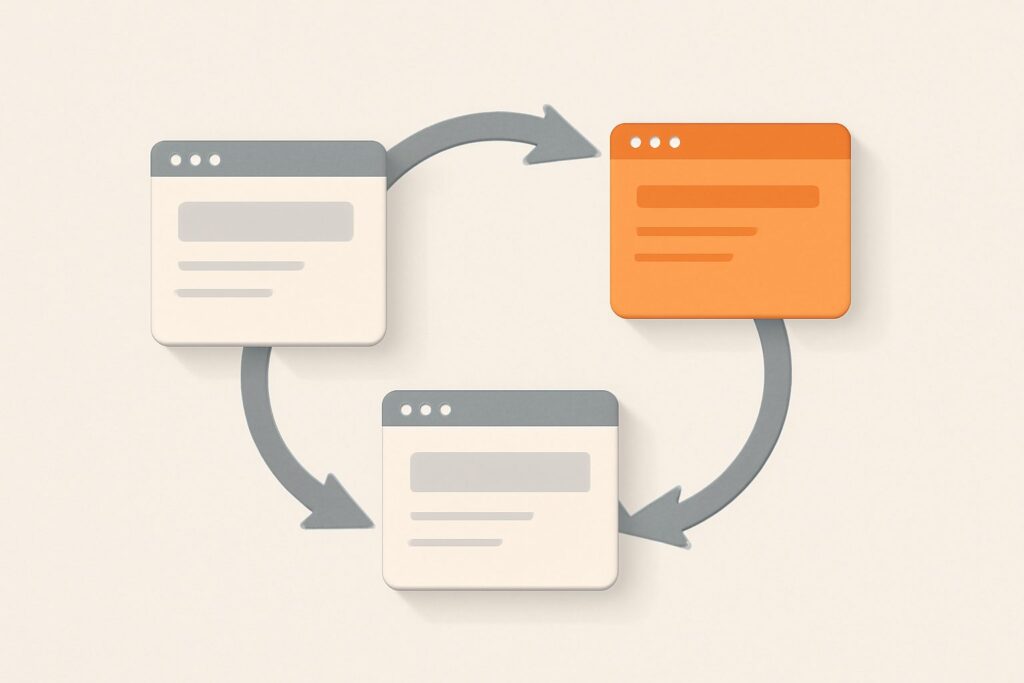
A redirect chain is any sequence where a URL passes a crawler or browser through two or more hops before it reaches a final page that returns a 200 OK. The canonical example is a legacy blog post that was moved once during an HTTPS migration and again during a URL-structure change: http://site.com/old-post → https://site.com/old-post → https://site.com/blog/new-post. Every one of those arrows is a separate HTTP response with a 3xx status code and a Location header pointing to the next stop.
One hop is normal and expected — that’s just a redirect doing its job. Two or more is a chain, and the cost scales with length. The fix is almost always to make the first URL point straight at the final destination, so any redirect the crawler encounters resolves in a single step. Collapse every chain to one hop — that principle is the entire discipline here.
Redirect Chains vs Redirect Loops
These two failure modes look similar in a report but behave completely differently. A chain always terminates: it’s slow and wasteful, but the crawler eventually reaches real content. A redirect loop never terminates — URL A sends you to B, and B sends you back to A, so the request bounces forever until the browser or bot gives up. Users hit a loop as a hard error page (Chrome shows ERR_TOO_MANY_REDIRECTS); Googlebot logs it as a redirect error and the page simply never gets indexed.
The practical distinction: a chain degrades a page, a loop kills it. A chained page can still rank — it just carries a handicap. A looped page is invisible to search entirely, because no crawler ever sees its content. Both belong in the same audit, but loops are the five-alarm fire and get fixed first.
The 10-Hop Limit: When Googlebot Gives Up
Googlebot does not follow redirects indefinitely. Per Google’s own documentation, it follows up to 10 redirect hops in a single crawl attempt; if it hasn’t reached content by then, Search Console reports a redirect error and the URL goes unindexed. Ten sounds generous until you realize how chains accumulate: a URL that already sits three hops deep only needs a locale redirect, a trailing-slash rule, and a case-normalization rule stacked on top to blow past the limit on a subset of pages.
Even well short of 10, long chains are risky because each hop is served by a potentially different layer — CDN, load balancer, application, CMS plugin — any of which can be reconfigured independently. A chain of four today can silently become six after a plugin update. The 10-hop ceiling isn’t a target to stay under; it’s a reminder that the safe number of hops is one.
Do Chained Redirects Cost You Link Equity?
Here’s where a lot of older advice is now wrong, and getting it right changes how you prioritize. Google has stated that 301 (and 302) redirects no longer cause a loss of PageRank — link equity passes through them intact. So the classic scare line, “every hop leaks a percentage of your link juice,” is outdated. On the pure ranking-signal axis, a three-hop chain and a one-hop redirect pass the same equity to the destination.
That does not make chains harmless, and this is the nuance most “chained redirects seo” posts miss. The damage from chained redirects isn’t lost PageRank — it’s crawl waste, latency, and configuration fragility. You fix chains not to recover mythical equity but to make your site faster, more crawlable, and less likely to break. Understanding the real mechanism keeps you from over-weighting a problem that no longer exists while ignoring the ones that do.
The Real Costs: Latency and Crawl Budget
Every hop is a full network round trip: DNS lookup (sometimes), TCP handshake, TLS negotiation, and a server response before the next request even starts. On mobile connections that can add hundreds of milliseconds per hop. Because redirects resolve before the destination page begins loading, a long chain directly delays the moment your content starts rendering — which feeds straight into Largest Contentful Paint, where the “good” threshold is 2.5 seconds. Chains are one of the quieter ways a page fails Core Web Vitals.
The crawl-budget cost is just as real for large sites. Googlebot allocates a finite number of fetches per site per day; a chain spends multiple fetches to index one page. Multiply that across tens of thousands of migrated URLs and you’re burning crawl budget on plumbing instead of on discovering new content. For a small brochure site this is negligible; for a large e-commerce catalog or news archive, collapsing chains can measurably improve how quickly fresh pages get crawled and indexed.
Where Redirect Chains Come From
Chains are almost never created on purpose — they accumulate as sediment from years of independent decisions. The usual culprits:
- Stacked migrations. An HTTP→HTTPS move, then a www→non-www consolidation, then a CMS replatform — each adds a redirect layer that never got flattened into the ones before it.
- Overlapping rules. A server-level HTTPS rule plus a CMS plugin doing its own canonical redirect, both firing on the same request in sequence.
- Trailing-slash and case normalization. One rule forces a trailing slash, another lowercases the path — a URL that violates both gets bounced twice before it’s clean.
- Internal links pointing at old URLs. If your navigation, sitemaps, or content still link to
/old-post, you feed the chain on every crawl even after the redirect map is correct.
That last one is the quiet killer. You can have a perfect one-hop redirect map and still generate chains at runtime if internal links target the pre-redirect URL. Fixing chains is a two-front job: clean the redirect rules, and update internal links to point at the final destination directly.
What Causes a Redirect Loop
A redirect loop is almost always two rules fighting each other. The classic case involves a CDN or load balancer that terminates SSL and forwards the request to your origin over plain HTTP. Your origin sees an HTTP request, applies its “force HTTPS” rule, and redirects to HTTPS — which the CDN receives, terminates again, and forwards as HTTP once more. The request ping-pongs forever. The fix is to make the origin trust the X-Forwarded-Proto header instead of the raw connection scheme.
Other loops come from a www rule and a non-www rule that each think the other host is canonical, or a redirect that accidentally targets itself after a path rewrite. Loops are deterministic — they fail the same way every time — so they’re usually quick to reproduce with a command-line request and quick to fix once you find the two conflicting rules.
How to Find Chains and Loops on Your Site
The fastest single-URL check is curl -IL https://example.com/page, which prints every hop’s status code and Location header so you can read the chain top to bottom. Browser DevTools does the same visually — the Network panel shows each 3xx before the final 200. But manual checks don’t scale past a handful of URLs, and chains hide in exactly the long-tail pages you’d never think to test by hand.
Site-wide, you need a crawler that reports redirect chains and loops as a dedicated finding. Desktop crawlers like Screaming Frog do this well for a point-in-time export. The gap is continuity: a manual crawl catches the chains that existed the day you ran it, then goes stale the moment a new migration introduces fresh ones. This is where SEO Rocket‘s real-crawler site audit fits — it surfaces chains, loops, broken links, and status-code problems automatically and continuously, with the fix explained in plain language, so a new chain gets flagged when it appears, not at the next quarterly audit. For the deepest log-file forensics on an enterprise crawl, a dedicated desktop tool still earns its place; SEO Rocket is the always-on layer that stops common problems from silently piling up between deep dives.
How to Fix a Redirect Chain: Collapse to One Hop
The fix is simple; the discipline is doing it everywhere. For every chain, rewrite the first redirect to point directly at the final 200-returning URL, and update the intermediate hops. A three-URL chain A → B → C becomes two clean one-hop rules: A → C and B → C. Now whichever old URL a crawler or backlink lands on, it resolves in a single step.
A minimal Apache example, mapping an old path straight to the final destination:
Redirect 301 /old-post https://example.com/blog/new-postThe nginx equivalent inside a server block:
location = /old-post {
    return 301 https://example.com/blog/new-post;
}
Then close the second front: crawl the site, find every internal link still pointing at /old-post (or any intermediate hop), and update it to the final URL. Redirects are a safety net for external links and bookmarks you don’t control — your own links should never need the net.
How to Fix a Redirect Loop
Start by reproducing it with curl -IL and reading the two URLs that alternate — those name the conflicting rules. If it’s the SSL-termination case, configure the origin to honor the proxy’s X-Forwarded-Proto header so it doesn’t re-force HTTPS on a request the CDN already secured. If it’s a www/non-www conflict, pick one canonical host and make sure only one rule redirects toward it. If it’s a self-referencing rewrite, tighten the match condition so the rule stops firing once the URL is in its target form. Loops are unambiguous once you see the two endpoints; the hard part is finding them, which is why continuous monitoring beats waiting for a user to hit an error page.
Picking the Right Status Code
The status code you choose tells search engines whether the move is permanent, and getting it right prevents future chains and lost signals:
- 301 Moved Permanently — the default for any move you intend to keep. Passes ranking signals and lets Google consolidate the old URL into the new one.
- 302 Found — temporary; use it only when the original URL will genuinely return. Google may treat a long-lived 302 as a de facto 301, but leaning on that is sloppy.
- 307 / 308 — the HTTP/1.1 counterparts that preserve the request method (307 temporary, 308 permanent); relevant when a POST must not silently become a GET.
Avoid meta-refresh and JavaScript redirects for permanent moves — they’re slower, weaker as canonical signals, and harder to audit than a clean server-side 301. When you consolidate a chain, make the surviving hop a 301 unless you have a specific reason not to.
Frequently Asked Questions
How many redirects in a chain is too many?
One hop is fine; two or more is a chain worth flattening. Googlebot follows up to 10 hops before erroring out, but treat that as a hard failure ceiling, not a budget — the target is always a single hop, because each additional one adds latency and a new point of failure.
Do redirect chains hurt SEO if 301s pass full link equity?
Yes, but not through lost PageRank. Since 301 and 302 redirects pass ranking signals intact, the harm from redirect chains is crawl-budget waste, added page latency (which feeds Core Web Vitals like LCP), and the fragility of stacked rules — not a drop in link value.
What’s the difference between a redirect chain and a redirect loop?
A chain eventually reaches a real page after several hops, so it’s slow but indexable. A redirect loop never resolves — two URLs point at each other endlessly — so users see an error and the page is never indexed. Loops are the more urgent fix.
Will fixing chains recover lost rankings?
Don’t expect a ranking jump from equity you never lost. What you should expect is faster crawling, quicker indexing, and better page-load metrics — durable technical wins that support rankings rather than a direct boost. Run a continuous audit so new chains get caught before they accumulate.