Most people hunting for KWFinder alternatives aren’t disappointed by the tool itself — they’ve simply outgrown it. KWFinder, part of the Mangools bundle, is one of the friendliest keyword-research experiences you can buy, and for a freelancer checking search volume and difficulty it does the job cleanly. The trouble starts when your work gets bigger than keyword lookups.
This roundup skips the padded top-twenty lists. Below are the KWFinder alternatives that genuinely hold up in daily use, what each one is actually best at, and — because it’s the honest answer — the case for staying exactly where you are.
Why people leave KWFinder
Three reasons come up repeatedly. The first is scope: KWFinder is a keyword tool, so serious rank tracking, backlink analysis, and SERP monitoring mean leaning on the rest of the Mangools suite or buying elsewhere. The second is depth — the database is solid for mainstream terms but thins out on long-tail and niche queries where a larger index pulls ahead. The third is lookup limits, which on the lower plans can feel tight once you’re researching several clients in a week.
None of that makes KWFinder a bad tool. It makes it a focused, beginner-friendly keyword instrument in a job that increasingly wants content writing and AI-answer visibility in the same place. That gap is where the alternatives compete.
Be fair to it before you switch, though. KWFinder’s interface is genuinely excellent — the difficulty score is easy to read, related-keyword suggestions are quick, and nobody gets lost in it. If your entire need is “find me some keywords and tell me how hard they are,” few tools feel this pleasant. The question isn’t whether KWFinder is good; it’s whether keyword research alone is still the whole job.
How we compared them
Every tool here was judged on four things a working SEO actually cares about: the depth and freshness of the keyword data, honest total cost rather than the headline number, whether AI content and AI-search visibility are built in or bolted on, and who the tool genuinely suits. Difficulty scores and volume estimates vary between providers, so treat cross-tool number gaps as directional, not gospel.
KWFinder alternatives at a glance
Start with the table, then read the notes on the two or three that fit your situation.
| Tool | Best for | AI-native? | Standout strength | Rough price band |
|---|---|---|---|---|
| SEO Rocket | Solo SEOs, consultants & agencies who want one AI-driven workflow | Yes — chat-first | Deep keyword data + AI writing + AI-search visibility in one place | Low $ / entry-friendly |
| Semrush | Marketing teams wanting an all-in-one suite | Add-ons | Breadth — PPC, content, social in one login | Higher $$ |
| Ahrefs | Link-focused SEOs and deep researchers | Some | Large keyword and backlink index | Higher $$ |
| Moz Pro | Beginners who value a gentle UI | No | Clean interface, trusted authority metric | Mid $$ |
| Serpstat | Agencies watching cost per project | Some | Broad feature set at a lower price | Low–mid $ |
| Ubersuggest | Hobbyists & very small budgets | Light | Cheap, simple keyword ideas | Low $ |
SEO Rocket — the AI-native pick
SEO Rocket is built for how the job works now. Instead of jumping between a keyword tab, a rank tracker, and a separate writer, you ask for what you need in plain language and it runs the lookup — keyword ideas, difficulty, competitor gaps, rank tracking — on real, deep data underneath. The interface stays as simple as KWFinder’s; the difference is what happens after you find the keyword.
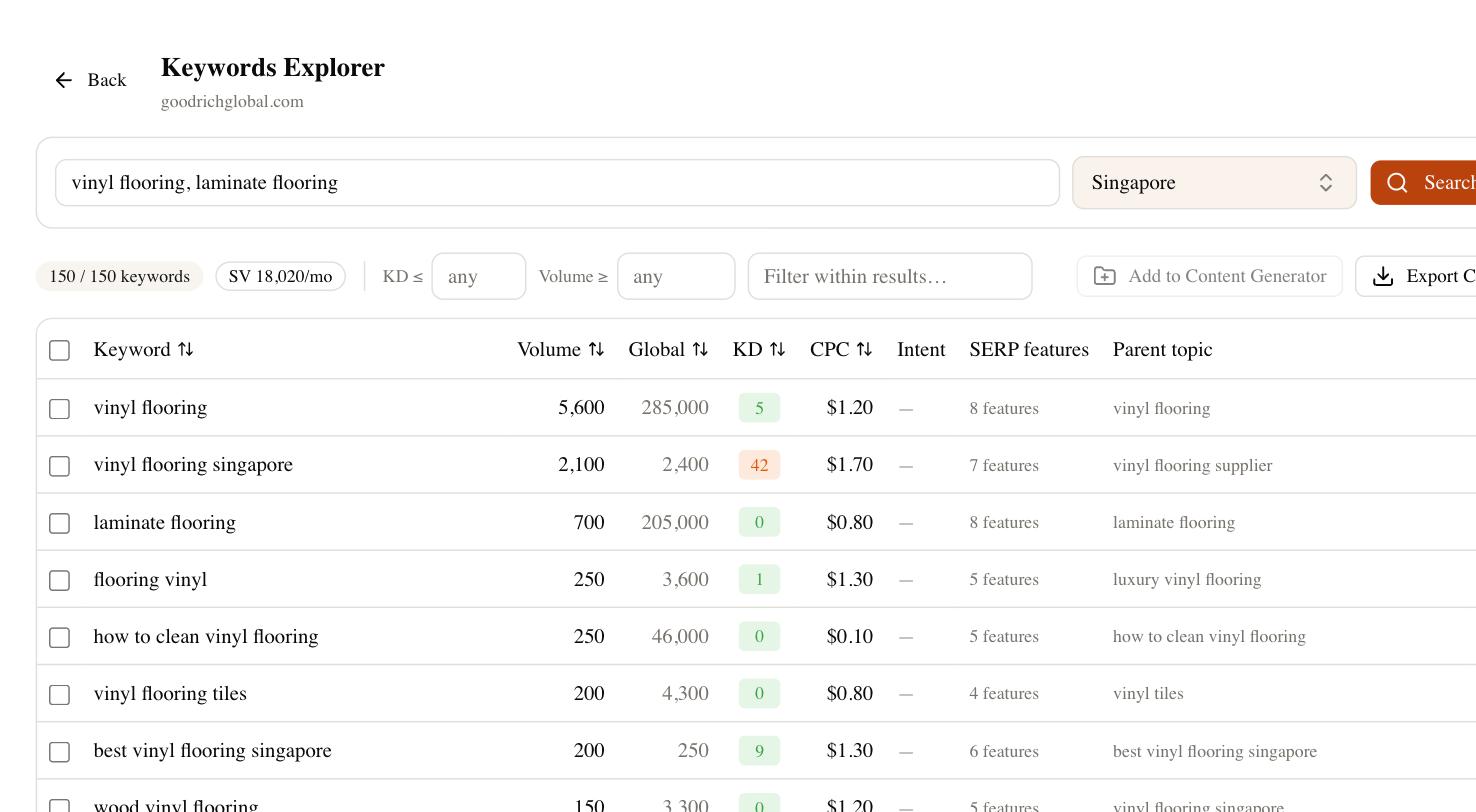
That consolidation is the real saving. A stack of KWFinder for research, a second subscription for writing, and a third for AI-visibility tracking collapses into one login, and the entry pricing stays friendly rather than climbing into suite territory. If you’re a consultant, the client-dashboard side lets you hand a read-only report straight to a client without exporting spreadsheets.
The AI-visibility piece is the part no keyword tool answers. Search is splitting — some of your buyers now ask ChatGPT or Perplexity instead of Google, and a page ranking first can still be missing from an AI answer. SEO Rocket tracks whether and where you’re cited across those surfaces, so you optimize for the search that’s actually happening. For anyone whose bottleneck is doing more with fewer tools, which describes most people reading this, that combination is the strongest fit on the list.
Semrush and Ahrefs — the heavyweight suites
If your reason for leaving KWFinder is depth rather than price, the two big suites are the obvious step up. Semrush is the closest thing to a do-everything marketing platform: beyond keywords it covers PPC research, content tooling, and competitive analysis, so a team wanting one login for the whole channel mix gets real value. Ahrefs leans the other way, pairing a large keyword index with one of the freshest backlink databases around — the pick if link data matters as much as keywords.
The trade-off for both is the same, only more so than KWFinder: they’re expensive once you add the features that justify buying them, and the breadth brings a steeper learning curve. If you only want keyword research, you’ll pay for a lot of suite you never open.
Moz Pro, Serpstat and Ubersuggest
The mid-market has a tool for almost every budget and temperament.
- Moz Pro — the friendliest on-ramp of the suites. Its clean interface and long-trusted authority metric make it an easy switch if you want a step up from KWFinder without overwhelm, though its index is smaller than the heavyweights.
- Serpstat — the value play. It bundles keyword research, rank tracking, and site audit at a lower price point, which suits agencies watching cost per project.
- Ubersuggest — the budget entry point. It won’t match the big indexes on depth, but for a hobby site or a first client it delivers usable keyword ideas for very little.
Any of these covers core keyword needs. What none of them do well yet is fold AI writing and AI-answer visibility into the same workflow — you’ll still be running a second subscription for that.
When you should just keep KWFinder
Honesty matters here. If keyword research is genuinely all you do — you find terms, note the difficulty, and hand them to a writer or plug them into a workflow that lives elsewhere — KWFinder is hard to beat on ease and price. The Mangools bundle also gives you basic rank tracking and SERP analysis for a low, predictable monthly figure, which is plenty for a small site or a freelancer with a handful of clients. The right question isn’t “is there something more powerful,” it’s “do I actually need the extra power.” For a lot of people, the answer is no, and switching just adds cost and complexity.
How to choose your KWFinder alternative
Match the tool to your real constraint, not to a feature checklist. If tool-sprawl is the problem and you want AI writing plus AI-search tracking built in, SEO Rocket is the natural move. If you need serious depth and one platform for every marketing channel, Semrush or Ahrefs earns its price. If you just want a slightly bigger keyword-and-rank tool at a gentle cost, Moz, Serpstat, or Ubersuggest will do. And if keyword research is your whole world, there’s no shame in staying put.
A quick way to decide: write down the three tasks you actually did last week. If the list is some mix of “find keywords,” “check what I rank for,” and “produce a piece of content,” you’re already reaching past what a keyword-only tool covers — and a leaner, AI-native option will handle all three faster. If instead your week was purely research you handed off elsewhere, keep the tool you know. Whatever you pick, run your own site and two competitors through it for a full week before judging; volume and difficulty numbers jitter, and the tool that answers your real questions fastest is the right alternative for you.