
SEO for WooCommerce is different from SEO on a hosted store, and the difference cuts both ways. Because WooCommerce is a WordPress plugin, you own the server, the templates, and the URL structure outright — there is almost nothing you cannot change. But that same openness means good SEO for WooCommerce is a plumbing job as much as a content one, and a fresh install ships with a few defaults that quietly work against you.
This guide skips the generic checklist. It covers what the platform genuinely lets you control, where it has real limits, the highest-leverage fixes, and the specific mistakes that keep WooCommerce stores off page one.
You control the URLs — so use that control
Unlike Shopify, which forces every product under /products/ and every category under /collections/, WooCommerce lets you shape permalinks however you want. Out of the box it inserts a /product/ base into product URLs and /product-category/ into category URLs. Neither helps you. Go to Settings, then Permalinks, and under the WooCommerce “Product permalinks” section you can strip the product base to a bare slug or nest products under their category. Most stores are better off with clean, shallow URLs like /blue-running-shoes/.
One decision matters more than it looks: WooCommerce keeps products at a single canonical URL even when a product sits in several categories, which avoids the duplicate-URL mess that trips up other platforms. Set your permalink structure once, before you have traffic. Changing it later means a wave of redirects, and WooCommerce has no built-in redirect manager — you will need a plugin like Redirection or the redirect module inside Rank Math to avoid a page of 404s.
The page-speed problem is real
Here is the honest limitation. WooCommerce is heavier than a hosted store because it is WordPress, PHP, and a database doing work on every request, often on shared hosting that cannot keep up. The single biggest culprit is cart fragments: WooCommerce loads a script called wc-cart-fragments that fires an uncached AJAX request on nearly every page load to keep the mini-cart live. On pages with no add-to-cart button, that request is pure dead weight, and it makes full-page caching harder because the cart is dynamic.
You can fix most of this, but you have to do it deliberately. Put a real page cache in front of the site, add object caching with Redis, dequeue cart fragments on pages that do not need them, and serve images in a modern format. Cut the plugin count too — every extra plugin adds scripts and database queries to the same page load, and WooCommerce stores accumulate them fast. WooCommerce will never be as fast as a static store by default, but a well-tuned install on decent hosting passes Core Web Vitals comfortably. Assume nothing; measure it on a real product page, not the homepage.
Where WooCommerce quietly wins: rendering and schema
Two things work in your favor and cost you nothing. First, WooCommerce is server-rendered PHP, so Google receives fully-formed HTML on the first request. You avoid the crawl-and-render delays and indexing gaps that hit JavaScript storefronts. Content is there in the source, not painted in later by a script.
Second, WooCommerce outputs Product structured data — name, price, availability, SKU, and aggregate rating — as JSON-LD automatically, with no plugin required. That is the markup Google uses for rich product results. It is not perfect; the native output can miss fields, and Google has tightened the rules on self-applied review stars. An SEO plugin such as Rank Math or Yoast SEO cleans up and extends the schema, but the foundation ships in the box.
The mistake that buries stores: faceted navigation
WooCommerce’s layered-navigation filters and sorting options generate URLs on the fly — ?filter_color=blue, ?orderby=price, ?min_price=20, ?paged=2. Every combination is a crawlable, near-duplicate version of your category page. Left alone, a store with a few filters can spawn thousands of thin parameter URLs, and Google will happily waste its crawl budget on them instead of your real pages. This is the number-one technical failure on WooCommerce stores.
The fix is boring and essential: keep filtered and sorted URLs canonicalized back to the clean category page, and use robots rules or nofollow on filter links so bots stop wandering into the parameter maze. Handle the same problem on internal search pages (?s=) and the default WordPress author, tag, and date archives, which WooCommerce inherits and rarely needs indexed.
Highest-leverage moves that actually work
Category pages are where the money keywords live, and they are the most neglected part of a WooCommerce store. A bare category page is just a product grid with a one-line title — nothing for Google to rank on a competitive term. Add a genuine intro paragraph and a block of supporting copy below the products, both editable in the category’s description field. This is usually the fastest ranking win on the whole site.
Product pages need unique descriptions, not the manufacturer’s boilerplate that fifty other stores are also using. Fill in the short description, the long description, real image alt text, and the SKU. Do not delete discontinued products and let them 404 — either keep the URL live if it still gets traffic or 301 it to the closest replacement. When you are deciding which categories and products to build out first, the question is which terms your competitors already rank for that you do not.
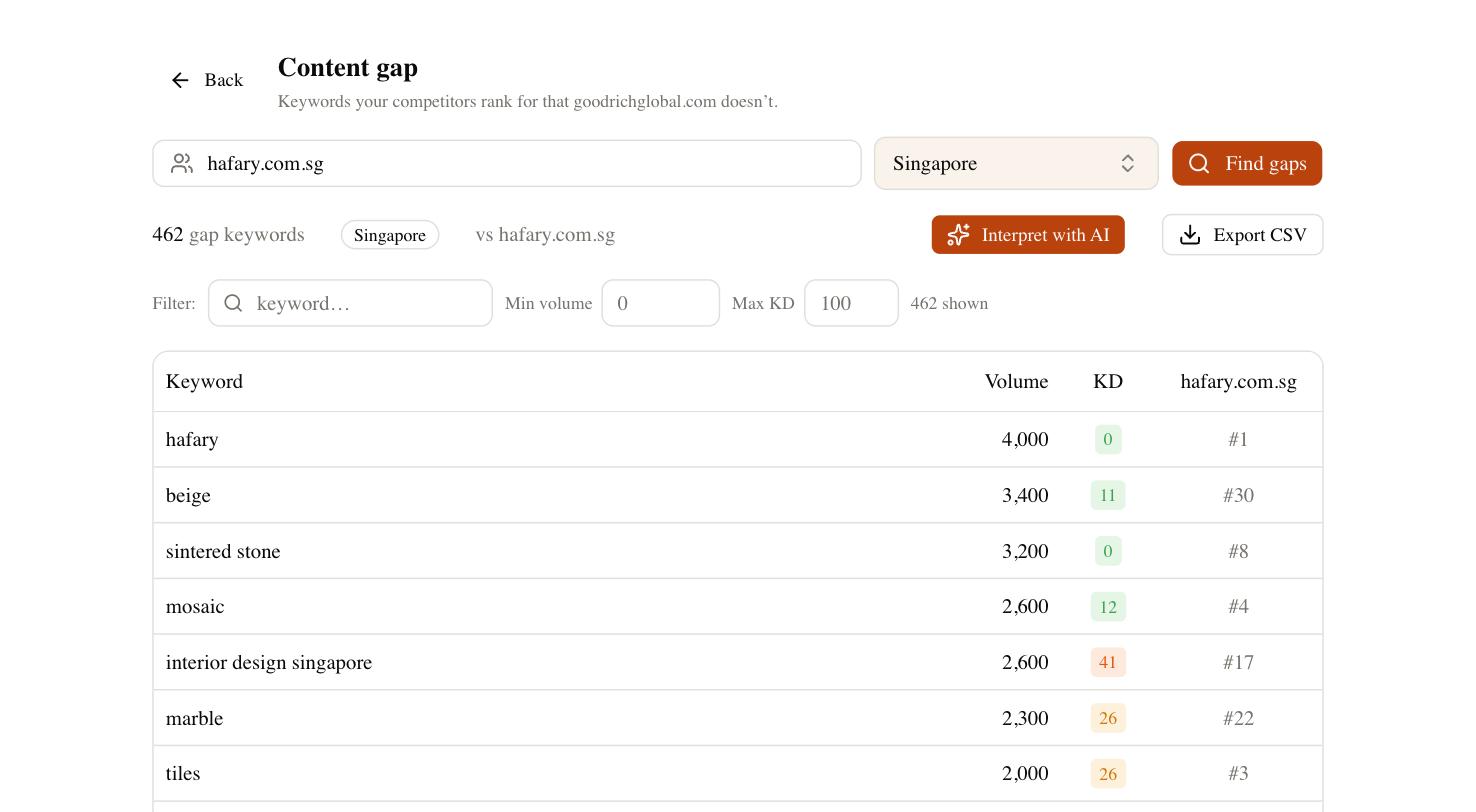
SEO Rocket’s Content Gap does exactly that: point it at two or three competing stores and it returns the keywords they rank for that you are missing, each with search volume and keyword difficulty, so you can prioritize the category and product pages worth writing first. From the same chat you can draft that category copy, track where the new pages land, run a site audit that flags the parameter-URL bloat above, and check whether your products even surface in AI answers through Brand Radar — increasingly its own shopping channel.
Your WooCommerce SEO checklist
Work down this list before you chase anything more exotic. Most WooCommerce stores that plateau are failing three or four of these, not lacking backlinks.
- Strip the
/product/and/product-category/bases; set clean permalinks before you have traffic. - Install one SEO plugin (Rank Math, Yoast, or SEOPress) for titles, meta descriptions, sitemaps, and enhanced schema.
- Canonicalize or noindex filter, sort, and search parameter URLs.
- Add real intro and supporting copy to every category page you want to rank.
- Write unique product descriptions and alt text; never ship manufacturer boilerplate.
- Add page caching, Redis object caching, and dequeue cart fragments off non-shop pages.
- Install a redirect plugin and 301 discontinued products instead of 404-ing them.
- Confirm your Product JSON-LD validates in Google’s Rich Results Test.
None of this is glamorous, and none of it is hidden behind a platform wall — that is the point. WooCommerce hands you the keys to every setting that matters, which means the results are on you. Fix the plumbing, give your category pages something to rank with, and stop the crawler from drowning in filter URLs, and the platform will carry you as far as your content and links can.