
SEO for Substack is a genuinely different game from SEO on WordPress, and treating it like the same job will waste your time. Substack was built as an email platform first and a website second, so seo for Substack means working inside a fixed set of controls — a few better than people expect, several worse — rather than tuning everything yourself.
The upside is that Substack handles a lot of the boring technical work for you: clean server-rendered pages, an automatic sitemap, mobile-friendly layouts, and reasonable load times out of the box. The downside is that when you hit a wall — a broken URL, a missing redirect, a schema gap — there is usually no setting to fix it. This guide covers exactly where those walls are and how to get real search traffic without pretending they don’t exist.
What actually makes Substack different
Substack is a hosted platform, which means you rent your setup instead of owning it. Every publication lives at either a yourname.substack.com subdomain or a custom domain, and every post sits at a /p/post-slug path. You do not touch the server, the robots file, or the theme. That closed model is why so much generic SEO advice — edit your .htaccess, install a caching plugin, add a schema block — simply does not apply here.
The other big difference is the email-first mindset. Most Substack writers optimize for the inbox and forget the post also has a public web page that Google can index. Those two audiences want different things: a subscriber already knows who you are, while a searcher is meeting you cold and needs context in the title and opening lines. The writers who win on search are the ones who remember the web page exists at all, and who write the first paragraph for a stranger as much as for a fan.
The settings you actually control
Substack gives you more on-page control than people assume — you just have to go looking for it. Inside each post’s settings panel there are separate fields for the search engine title and description, distinct from your headline and from the social preview. Fill them in. If you leave them blank, Substack falls back to your post title and opening lines, which are written for readers, not for a search result snippet.
- Post slug — editable before you publish. Set a short, keyword-relevant slug and lock it in.
- Search engine title and description — the closest thing you have to a meta title and meta description. Always fill these.
- Social preview — separate title, description, and image for when the post is shared.
- Image alt text — supported in the editor. Add it for accessibility and image search.
- Canonical URL — available for imported or cross-posted content, so you avoid duplicate-content problems.
- Custom domain — a one-time setup option that moves you off the shared subdomain.
- Sections — Substack’s version of categories, useful for grouping related posts.
Substack’s real SEO limitations
Here is the honest part. Substack has hard limits that no workaround fully solves, and you should plan around them rather than fight them.
The biggest one is redirects. If you change a published post’s slug, the old URL breaks and returns nothing useful — there is no redirect manager to point the old link at the new one. So any backlinks or shares pointing at the original address are lost. Treat every published URL as permanent. Structured data is another gap: Substack applies its own basic article markup, but you cannot add FAQ, HowTo, product, or review schema, so you forfeit the rich results those can earn on other platforms. You also cannot edit robots directives per page, you cannot control internal site architecture beyond linking inside your own posts, and page speed is entirely Substack’s to manage. Paywalled content is the quiet killer — anything behind the subscriber wall is largely invisible to search, because Google indexes what a logged-out visitor sees.
The highest-leverage moves
Given those constraints, a short list of actions does most of the work. Move on a custom domain early: ranking a yourname.substack.com subdomain means you are building authority for Substack’s domain more than your own brand, and migrating later is painful. Keep genuinely valuable posts fully free and public, because a gated post cannot rank for the keyword that would have brought new readers in the first place.
Then treat titles like search assets. Pick post topics and headlines around terms people actually search, write the search engine title and description deliberately, and link between your own related posts to spread relevance. Lock your slugs before publishing, add alt text as you go, and set the canonical field whenever you republish something that lives elsewhere. None of this is exotic — it is just the small set of levers Substack actually hands you, used consistently.
Mistakes that quietly cost you traffic
The most common one is paywalling everything and then wondering why no post ranks. If search is a growth channel for you, some of your best work has to stay public. A close second is staying on the subdomain out of inertia, then trying to build a brand that Google never fully attributes to you. Changing slugs after publishing shows up constantly too — writers “clean up” an old URL and silently break every link to it.
The subtler mistake is leaving the SEO fields blank and letting Substack auto-generate everything. Auto snippets are fine; deliberate ones are better, especially the description that decides whether anyone clicks your result. And plenty of writers never do keyword research at all, publishing headlines that read beautifully in an inbox but match nothing anyone types into a search bar.
Where SEO Rocket fits
Because Substack limits the technical side, your leverage moves upstream to research and measurement — which is where a tool actually helps. Before you write, run your topic through SEO Rocket’s Keywords Explorer to see what people search, how much volume a term carries, and how hard it is to rank, so your headline targets a real query instead of a guess.
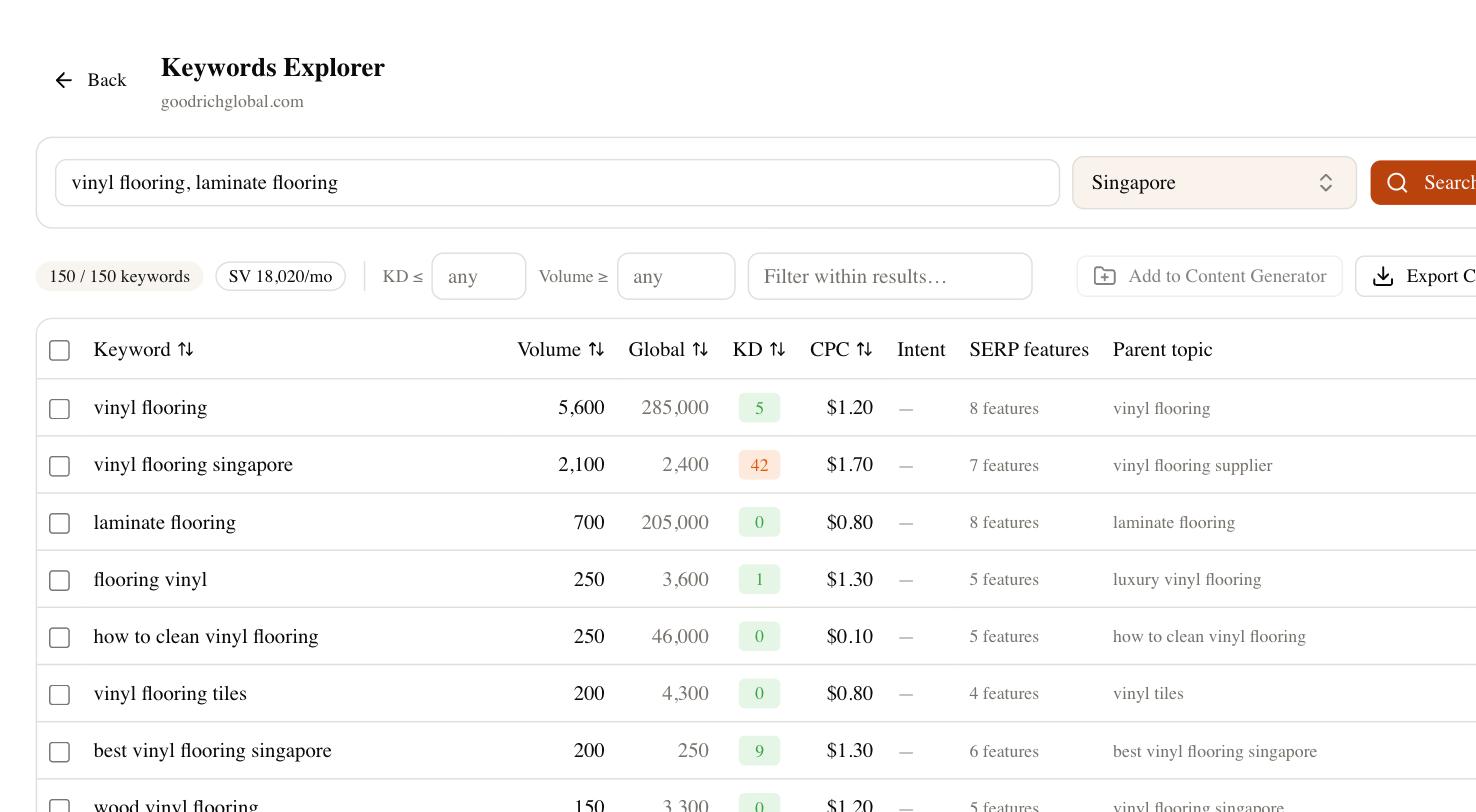
After you publish, rank tracking tells you whether posts are climbing, and the competitor gap view shows which topics rival newsletters rank for that you have not covered yet. Brand Radar adds the piece traditional tools miss: whether AI search assistants cite your publication when someone asks about your subject. You still can’t rewrite Substack’s technical guts, but you can point your writing at questions that convert and measure whether it worked.
The honest bottom line
Substack will never give you the technical control of a self-hosted site, and if deep SEO customization is central to your strategy, that limitation is real. But for a writer whose main job is publishing consistently, it removes most of the technical burden and leaves you a small, workable set of controls. Use a custom domain, keep your best posts public, fill in every SEO field, never change a live slug, and choose topics from real search demand. Do those five things and you have done the bulk of practical SEO for Substack — and the rest is simply writing things worth ranking.