
SEO for directories is not regular SEO with a different logo pasted on. A directory is a database that renders thousands of near-identical pages from one template, and that single fact rewrites your whole playbook. The moves that grow a blog — write a great post, earn a few links, rank — can quietly bury a directory instead, because scale is both your product and your biggest liability.
Getting SEO for directories right means treating your page count as a budget you can overspend. Google will happily crawl a hundred thousand listing pages, decide most of them are thin, and drag the good ones down with the bad. Below is what that means in practice, what you actually control, and where the leverage really sits.
Why a directory behaves differently
Every listing page on a directory shares the same skeleton: a name, an address, a category, maybe hours and a phone number. Multiply that by ten thousand entries and you have ten thousand pages that are 90% boilerplate. Google’s classifiers were built for exactly this pattern, and they read most of it as thin or duplicate content. A single one of those pages, in isolation, might look fine. In aggregate they signal a low-value site, and that aggregate judgment is what decides whether your category and location hubs rank at all.
The second difference is faceted navigation. Filters for price, rating, neighborhood, and “open now” each generate a URL, and combinations multiply fast. Left unchecked, a directory can spin up millions of crawlable filter URLs that carry no unique value — pure crawl-budget waste that keeps Google away from the pages you care about.
What you actually control
Your leverage depends entirely on whether you run the platform or rent space on someone else’s. If you own the codebase — a WordPress directory theme, a custom Rails app, a headless build — you control URLs, meta tags, canonicals, redirects, rendering, and schema outright. If you are listing your business on a third-party directory like Yelp or a niche portal, you control almost nothing: the URL, the template, and the indexation rules belong to them. This guide assumes you run the directory. If you only have a listing on one, your job is different — fill every field, add photos, keep your name, address, and phone consistent, and treat it as a citation, not a page you can optimize. The rest of what follows applies once the platform is yours to shape.
Assuming you own it, here is the honest map of your controls and where the platform fights you.
| Lever | Control on a directory | The catch |
|---|---|---|
| URL structure | Full | Filter params leak crawlable URLs unless you rein them in |
| Meta titles / descriptions | Full, but templated | Templated tags look duplicated at scale — needs dynamic variables |
| Indexation (noindex/canonical) | Full | The single most important lever, and the easiest to get wrong |
| Rendering / JavaScript | Depends on stack | Client-only rendering delays or drops listing content from the index |
| Structured data | Full | Wrong types (or fake reviews in markup) trigger manual actions |
| Page speed | Partial | Listing pages with maps and photos are heavy by nature |
Indexation is the whole game
On a content site you want everything indexed. On a directory you want the opposite: index the pages that can rank, and keep the rest out of the index entirely. That inversion trips up almost everyone.
Your category and location hubs — “plumbers in Austin,” “vegan restaurants near me” — are the pages with search demand and a real shot at ranking. Individual listings usually have none, because nobody searches for one business by the exact string your template generates. So the pattern that works is to let hubs be indexed and internally linked, and to noindex thin individual listings until they earn genuine content or reviews. Faceted filter URLs get canonicalized back to the clean category page or blocked in robots.txt so Google never wastes a crawl on them. This is not about hiding pages; it is about spending a finite crawl budget on the pages that pay you back.
Rendering and speed, honestly
Many modern directories are single-page apps that load listings with JavaScript after the initial HTML arrives. Google can render JavaScript, but it does it on a delay and not always completely, so a directory that ships an empty shell and fills it client-side risks having its most important content — the listings themselves — arrive late or not at all. Server-side rendering or static generation for hub and listing pages removes that gamble. If you cannot change the stack, at least make sure the listing names, addresses, and links are in the initial HTML response.
Speed is a real constraint here, not a nice-to-have. Listing pages carry embedded maps, photo grids, and third-party review widgets, all of which are heavy. Lazy-load images below the fold, defer the map until interaction, and keep the largest contentful element — usually the listing title or hero — early and light. You will not hit a perfect score on a page with a live map, and that is fine; aim for fast enough that Core Web Vitals stay in the green.
Structured data that helps, not hurts
Directories have some of the richest schema options available, and using them well earns visible advantages in the results. Mark up category and search-result pages with ItemList, individual entries with the correct type — LocalBusiness, Restaurant, or a specific subtype — and always include BreadcrumbList so your hierarchy shows in the listing. Where genuine ratings exist, aggregateRating can win star snippets that lift click-through.
The line you cannot cross: never mark up reviews or ratings you did not actually collect. Fabricated review schema is a well-known trigger for a manual action, and directories get scrutinized for it precisely because the incentive to fake it is so high. Mark up what is real, leave the rest out.
The mistakes that sink directory sites
Most failing directories share the same handful of errors. Watch for these specifically:
- Publishing empty listings. Ten thousand pages with a name and nothing else is index bloat, not coverage. Noindex them until they have substance.
- Templated meta tags with no variables. “Best [category] — Directory” repeated site-wide reads as duplicate. Inject location, count, and modifiers dynamically.
- Letting filters get crawled. Every uncontrolled facet param is crawl budget stolen from your real pages.
- Thin category hubs. A hub that is just a list of links ranks poorly. Add a genuine intro, local context, and FAQ content to the pages you actually want to win.
- Chasing volume over depth. Fifty deep, useful categories beat five thousand empty ones every time.
Where SEO Rocket fits
The strategic question for any directory is which categories and locations are worth building deeply — because you cannot make every hub excellent, and the empty ones cost you. That is a keyword and competitor-gap problem before it is a technical one. SEO Rocket’s competitor gap shows you the category and location queries rival directories rank for that you do not, with real volume and difficulty, so you invest your content effort where demand and a realistic opening actually overlap.
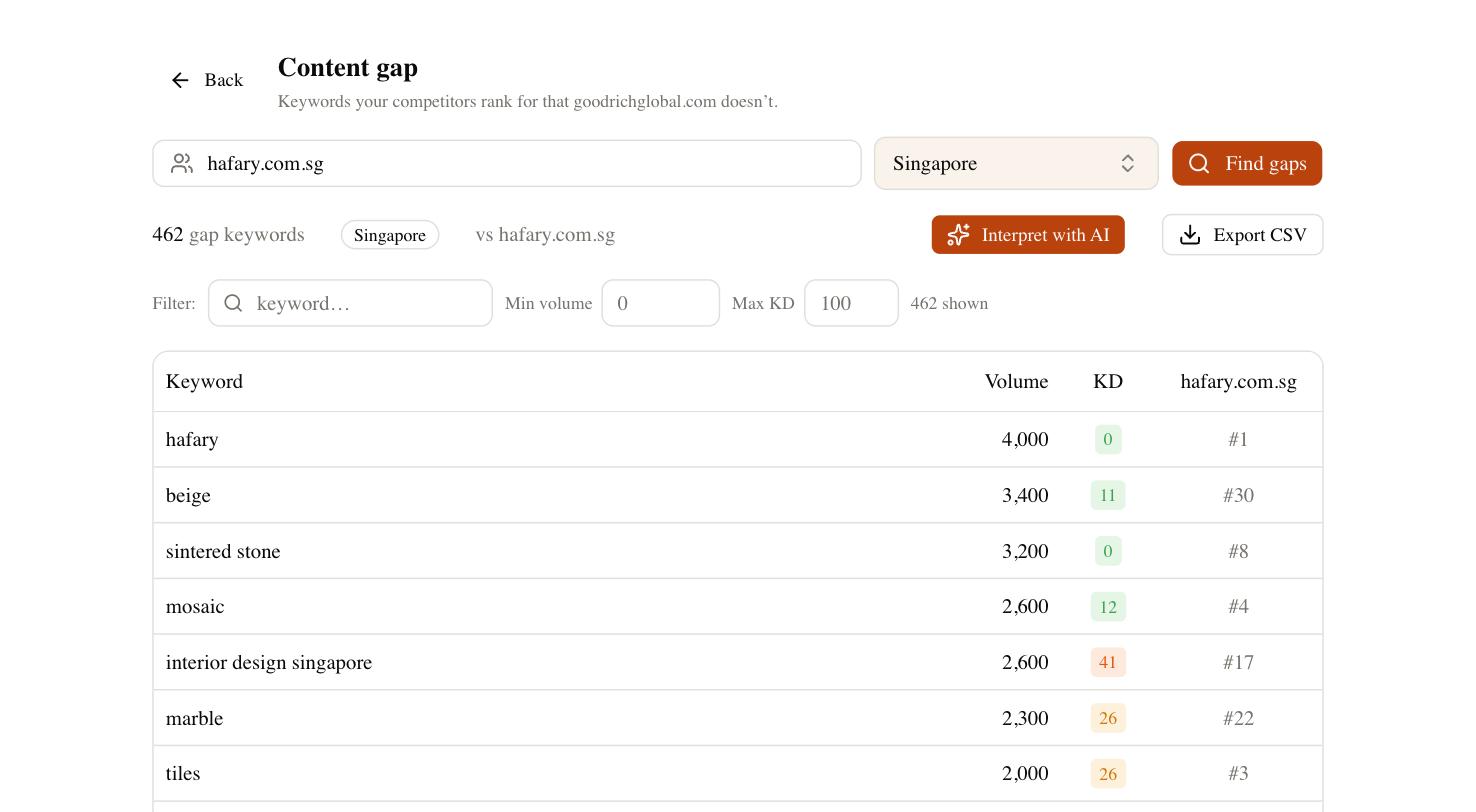
From there the site audit surfaces the directory-specific failure modes above — index bloat, duplicate templated titles, crawlable facets — so you can prune before they drag your hubs down. Rank tracking then tells you whether the categories you chose to build are actually climbing. None of it removes the core discipline of directory SEO: fewer, deeper pages, ruthless control of what gets indexed, and honest structured data. Get those three right and the scale that usually works against a directory starts working for you instead.