
SEO for eBay works nothing like SEO for a site you own, and pretending otherwise is where most sellers waste their time. You do not control your URLs, your meta tags, your page speed, or how the page renders — eBay owns all of that. What you do control is a short list of fields that feed two different search engines, and SEO for eBay is really the discipline of filling those fields well enough to win both.
This guide is specific to the platform: real settings, real caps, and the honest limitations. If you came looking for “write good content and build links,” that advice barely applies inside a marketplace. Here is what does.
You are optimizing for two search engines
Every eBay listing is indexed twice. The first engine is Cassini, eBay’s internal search, which decides where you land when a buyer types a query into the eBay search bar and sees the default Best Match sort. The second is Google, which sometimes surfaces individual item pages and eBay Store pages for long-tail product queries. They reward different things. Cassini leans heavily on your title, item specifics, price, and seller performance. Google reads the page eBay generates for you — a page whose title tag, meta description, and canonical you cannot edit. Most of your effort should go to Cassini, because that is where the buyers with intent already are.
What you genuinely can’t control
Be clear-eyed about the ceiling before you spend an hour on the wrong thing. On a standard listing you cannot set the URL slug — item pages are just /itm/ plus a numeric ID. You cannot write the HTML title tag or meta description Google shows; eBay assembles those from your listing title. You cannot add your own schema markup, control server response time, choose the canonical, or set up redirects when you end a listing. JavaScript rendering, mobile layout, and Core Web Vitals are eBay’s problem, not yours, and no amount of effort moves them. Stuffing your description with keywords does nothing for Cassini either — eBay’s search does not weight the free-text description the way an on-page SEO would expect, and keyword spam in the title can get a listing demoted under eBay’s search-manipulation policy.
The 80-character title is your single biggest lever
eBay caps listing titles at 80 characters, and Cassini reads that title before almost anything else. Use every character on words a buyer would actually type: brand, model, product type, key attributes like size, color, or capacity. Skip filler — “L@@K,” “WOW,” “rare,” and rows of punctuation cost you space and signal nothing. Front-load the most-searched terms, because relevance matching is strongest on the words near the start. Never pad the title with unrelated brand names to catch extra searches; that is exactly the behavior eBay penalizes, and it tanks your click-through when the wrong buyers land and bounce.
Item specifics are eBay’s version of structured data
If titles are your on-page copy, item specifics are your schema. These are the structured attribute fields — brand, MPN, style, size, material, UPC or GTIN — and Cassini uses them to match your listing to filtered searches and to the left-rail refinements buyers click. A listing that fills every relevant item specific appears in far more filtered result sets than one that fills the minimum. Add the product identifier (UPC, EAN, or ISBN) wherever one exists, because it lets eBay match your item to its catalog, which feeds both internal search and Google product surfaces. Leaving these blank is the most common self-inflicted wound in eBay SEO — it is free visibility you are choosing not to claim.
Best Match rewards behavior, not just keywords
Cassini is a performance-ranking system as much as a relevance one. Two listings with identical titles can rank very differently based on the seller behind them. The signals that move Best Match are concrete and mostly within your control.
| Lever | Why Cassini cares | Your move |
|---|---|---|
| Sell-through rate | Listings that convert get shown more | Price competitively; use quantity and watchers signals |
| Free & fast shipping | Buyer-preference signal | Offer free shipping and same/next-day handling where you can |
| Seller rating & defects | Trust and low-friction transactions | Chase Top Rated status; keep defect and late-shipment rates low |
| Return policy | Generous returns lift conversion | Offer 30-day returns if your margins allow |
| Photos | Complete, clean images lift clicks | Use all 12 slots, 1600px, plain background |
| Listing recency & format | Fresh, fixed-price listings favored | Prefer Good ‘Til Cancelled; revise stale listings |
None of these are hacks. They are the same things that make a buyer more likely to purchase, which is precisely why Cassini rewards them.
Where eBay listings show up on Google
Your item and Store pages can rank in Google, but on Google’s terms. Individual listings occasionally pick up long-tail queries — specific model numbers, discontinued parts, exact product names — where there is genuine buyer intent and little competition. eBay Stores give you more room: you can add a store description, build custom category pages, and, on the storefront, control some meta text. That makes a well-organized Store the part of your presence most likely to earn steady Google traffic. Do not expect a single listing to outrank a manufacturer’s product page or a retailer’s category page for a head term. The realistic win is the long tail, and the way to capture it is knowing which long-tail phrases people actually search.
Where SEO Rocket fits
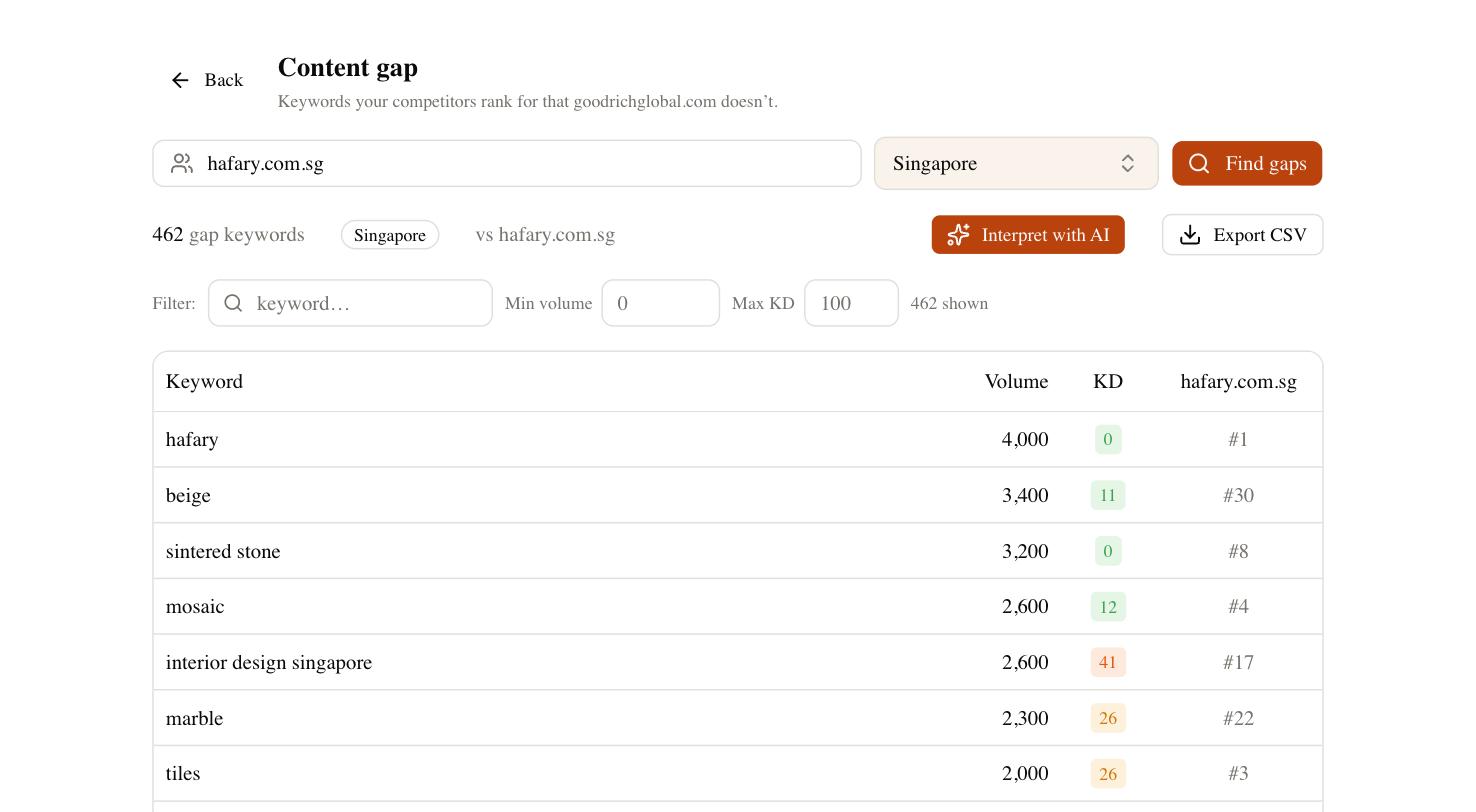
SEO Rocket is a website-SEO tool, not an eBay dashboard, so be honest about the boundary: it does not rank your listings inside Cassini. What it does is tell you what to put in your titles and item specifics. Ask it for the real search demand behind a product and you get the phrases buyers type into Google — the same intent that drives eBay searches — with volume and difficulty, so your 80 characters go to terms people want, not terms you guessed. Run a competitor gap against the retailers and eBay sellers ranking for your products and you see the queries they capture that you do not.
The Brand Radar side matters too as buyers start asking ChatGPT and Perplexity for product recommendations — you can see whether your Store or brand gets mentioned in those answers, a surface no eBay report touches. Use the tool for research and demand, then apply what you learn inside eBay’s fields.
A practical eBay SEO checklist
Work this list per listing and you will beat most of your competition, because most sellers skip half of it. Fill all 80 title characters with searched terms and no filler. Complete every relevant item specific and add a product identifier. Choose the most precise category, and a second category when it fits. Use all photo slots at high resolution on a plain background. Offer free shipping, fast handling, and 30-day returns where your margins allow. Keep your seller metrics clean and chase Top Rated status. Revise stale listings rather than leaving them to decay. Do this consistently, give Cassini a few weeks to register the improvement, and remember that on-platform rankings move day to day — judge the trend, not a single afternoon’s search result.