
SEO for Ghost is easier than it is on most content platforms, and that is exactly why people get lazy with it. Because Ghost ships with a sitemap, clean server-rendered pages, and per-post meta fields, a lot of writers assume the platform is handling SEO for Ghost on their behalf and never touch the settings that actually move rankings.
It isn’t. Ghost gives you a strong technical foundation and then hands you a few sharp edges — slug changes with no automatic redirect, public tag pages that breed thin content, and structured data you can’t extend without code. This guide covers what Ghost genuinely controls, where it honestly limits you, and the moves that pay off.
What Ghost gets right out of the box
Start with the good news, because it’s real. Ghost themes are server-rendered Handlebars, so your content is in the HTML on first load — no JavaScript rendering gap, no waiting for hydration, nothing for Google to miss. That alone puts you ahead of most headless and React-heavy setups where the crawler sees an empty shell.
Ghost also generates a clean XML sitemap automatically at /sitemap.xml, outputs valid Article JSON-LD on posts, fills in Open Graph and Twitter Card tags, and gives you per-post fields for meta title, meta description, canonical URL, and social images in the post settings sidebar. Page speed tends to be good by default — responsive images, lazy loading, and a CDN on Ghost(Pro). You do not need a plugin to get the basics right, which is the whole appeal.
URL structure is another quiet win. Ghost uses flat, dated-free slugs by default — yoursite.com/post-title/ rather than the messy /2024/11/category/post/ paths older platforms produce. Clean slugs are easier to read, easier to link to, and one less thing you have to configure. The catch, as you’ll see, is that the same slug freedom is where people hurt themselves.
Where Ghost honestly limits you
Now the trade-offs, because pretending they don’t exist helps no one. Ghost has no simple per-post “noindex” toggle — if you want to keep a page out of the index, you inject a robots meta tag through code injection or edit the theme. There’s no native way to add FAQ, HowTo, Product, or breadcrumb schema; you get Article schema and nothing else unless you hand-write JSON-LD yourself.
Editing robots.txt requires a theme-level file rather than a settings field, redirects live in a YAML file you manage in the admin rather than a friendly UI, and Ghost’s only real taxonomy is tags — there are no true categories. None of this is a dealbreaker. But it means the difference between a mediocre Ghost site and a strong one is the manual work most people skip.
The slug-and-redirect trap
This is the single most common way Ghost users tank their own traffic. When you change a published post’s slug, Ghost does not create a redirect from the old URL. The old link 404s, any backlinks pointing at it break, and the ranking you built evaporates — silently, because nothing warns you.
The fix is a habit, not a feature. Before you change any live URL, open Settings, go to the redirects file, and add a 301 from the old path to the new one. Do the same when you delete a post or restructure with a routes.yaml change. Ghost gives you the redirect tool; it just won’t remind you to use it, so build the check into your own workflow.
The same warning applies to your staging or preview site. If you launched from a temporary Ghost URL and Google indexed it, that duplicate can outrank or cannibalize your real domain. Lock non-production instances behind the members-only or private setting, and once you’re live, confirm in Search Console that only the canonical domain is indexed.
Tag pages: Ghost’s biggest self-inflicted problem
Every public tag in Ghost generates its own indexable page at /tag/name/. Sprinkle fifteen tags across thirty posts and you’ve created dozens of thin, near-duplicate listing pages competing with your actual content for crawl budget and relevance. Google notices, and it’s rarely flattering.
Ghost has a clean answer most users never discover: internal tags. Prefix a tag with a hash — like #draft or #series-x — and Ghost uses it for organization internally without ever publishing a public page for it. Use public tags only for the handful of topics you genuinely want ranking as hub pages, and make those tag pages substantial with a real description. Route everything else through internal tags.
The highest-leverage moves
A few actions return far more than the effort they cost on Ghost:
- Write custom meta, every time. Ghost falls back to the post title and an auto-generated excerpt. Those defaults are fine for humans and weak for search. Fill the meta title and meta description fields deliberately on every post.
- Set canonical URLs when you syndicate. If a post also lives on Medium, LinkedIn, or a client site, use the canonical URL field so Ghost keeps the ranking authority instead of leaking it.
- Use routes.yaml with intent. Ghost’s dynamic routing lets you build topic collections and control URL structure, but it’s powerful and easy to break. Change it deliberately, and add redirects for anything that moves.
- Treat images seriously. Set descriptive alt text on every image and upload files at a sensible size. Ghost handles delivery, but it can’t write your alt text or fix a 4MB hero image.
Adding schema and control with code injection
Code injection is where Ghost’s ceiling lifts. Site-wide header and footer injection, plus per-post injection, let you add the things the platform won’t: FAQ or breadcrumb JSON-LD on the posts that warrant it, analytics, a noindex tag on a specific page, or a custom Open Graph override. Keep it disciplined — inject only what you’ll maintain, and validate any schema you add with Google’s Rich Results Test before you assume it counts. Broken markup does nothing, and Ghost won’t catch the error for you.
Where SEO Rocket fits a Ghost workflow
Ghost is a great place to publish and a poor place to decide what to publish — it has no keyword data, no rank tracking, and no crawler. That’s the gap SEO Rocket fills. Ask it for keyword ideas in a niche and it returns real search volume and difficulty, so you’re briefing posts against demand instead of guessing.
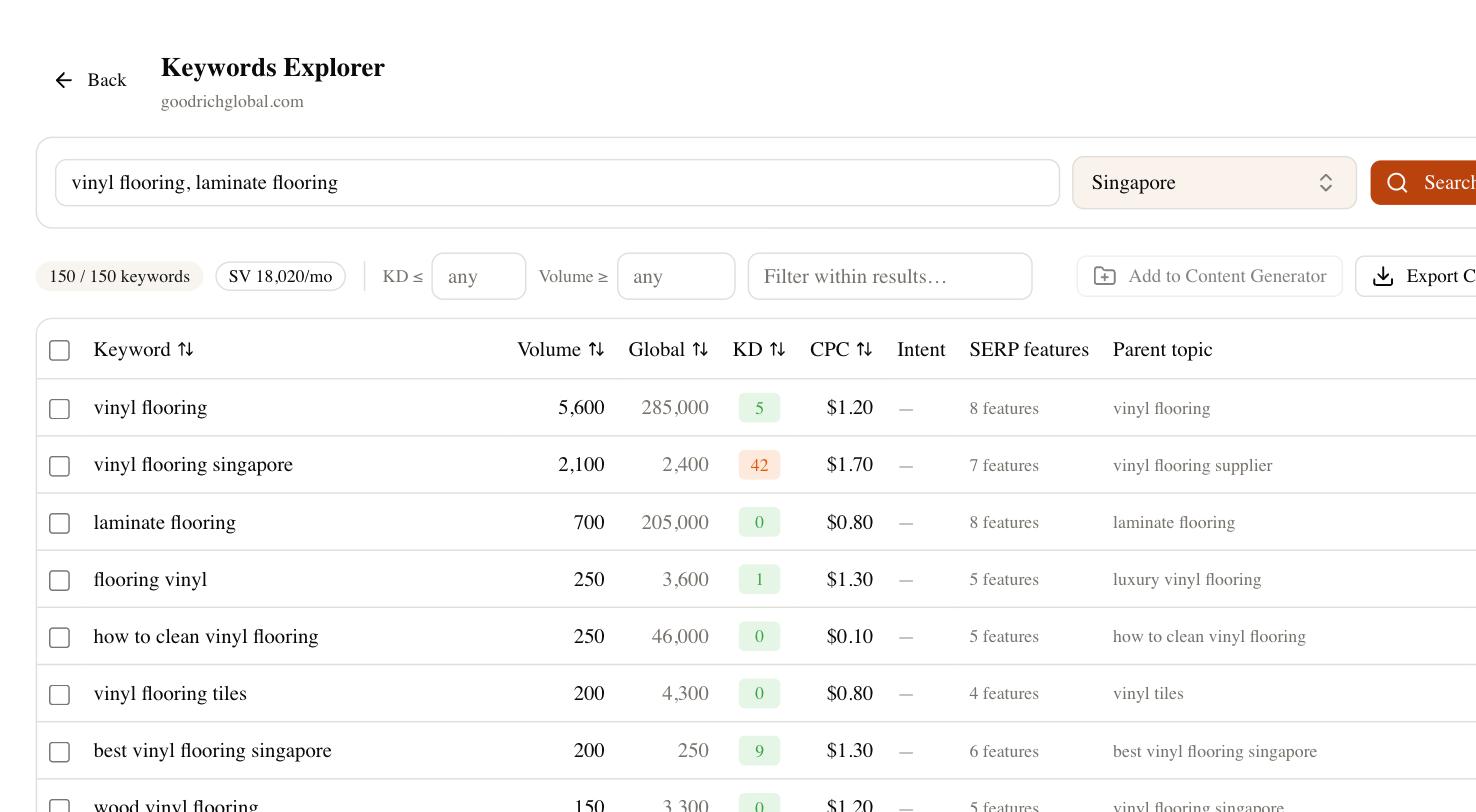
Its site audit crawls your live Ghost site the way Google does and surfaces exactly the problems this guide warns about — thin tag pages, missing meta descriptions, broken links from slug changes, orphaned posts. Rank tracking tells you whether a post is actually climbing, the competitor gap shows which topics your rivals cover that you don’t, and Brand Radar checks whether AI search tools like ChatGPT and Perplexity cite you at all. You can even draft a post with the AI writer and paste it straight into the Ghost editor.
A working Ghost SEO checklist
Run this on every post and revisit it quarterly for the whole site.
| Check | Where in Ghost | Why it matters |
|---|---|---|
| Custom meta title & description | Post settings sidebar | Defaults are weak; this is your click-through pitch |
| Canonical URL for syndicated posts | Post settings sidebar | Keeps ranking authority on your site |
| 301 redirect before any slug change | Settings → redirects file | Ghost won’t do it for you; skipping it 404s the page |
| Internal (#) tags for organization | Tag field | Prevents thin, indexable public tag pages |
| Alt text on every image | Editor image settings | Accessibility plus image search |
| Extra schema where warranted | Code injection | Ghost only outputs Article schema natively |
| Sitemap submitted | /sitemap.xml → Search Console | Ghost generates it; you still have to submit it |
Ghost rewards a light, consistent hand. The platform does the technical heavy lifting most CMSes make you fight for, which means your job is the handful of manual decisions it deliberately leaves to you. Get the meta, redirects, and tags right, point real keyword data at your editorial calendar, and Ghost becomes one of the easier platforms to rank on rather than a set of quiet traps.