SEO for Google Play is not website SEO with the word “app” pasted in. You are optimizing a store listing you only partly control, on a platform that hands you almost none of the technical knobs a web SEO reaches for first. SEO for Google Play lives inside a fixed template: same URL structure for every app, same rendered page, no meta tags you can write, no schema you can inject. Once you accept that, the work gets clearer, because the few levers that remain are unusually high-leverage.
This guide covers what you actually govern on a Play listing, the limits you should stop fighting, the moves that reliably shift ranking and installs, and the platform-specific mistakes that quietly cost downloads. It also draws the line honestly between Play Store search and Google web search — two different surfaces that people constantly confuse.
Why Google Play breaks your usual SEO playbook
A normal SEO campaign starts with control: your URLs, your title tags, your internal links, your Core Web Vitals, your structured data. On Google Play you have none of that. Your listing lives at play.google.com/store/apps/details?id=your.package.name, and that package name is permanent — set it at first publish and you can never change it without shipping an entirely new app and losing all your ranking history. The page is rendered by Google, styled by Google, and served by Google. You cannot touch load speed, JavaScript rendering, canonical tags, or redirects.
So the game moves to the fields you can edit and to the behavioral signals your app earns. Play’s search ranks primarily on keyword relevance in a handful of text fields plus quality signals — install velocity, ratings, review sentiment, retention, uninstall rate, and how often you update. That mix is closer to product-led growth than to link-building. A listing with weaker copy but strong ratings and low churn routinely outranks a beautifully written page that people install and delete the same day.
There is a second consequence worth naming. Because you cannot change the URL, cannot inject schema, and cannot touch rendering, most of the technical-SEO checklist you would run on a website simply does not apply here. That is freeing once you internalize it: you stop auditing things you can never fix and spend the time on copy, assets, localization, and retention — the four areas that actually respond to effort.
What you actually control
Your editable surface area is small and every field matters. The app title caps at 30 characters and carries the most ranking weight per word, so it is the single most important string you will write. The short description runs 80 characters, sits above the fold, and doubles as both a ranking field and your primary conversion line. The full description gives you up to 4,000 characters — Google reads it for keyword relevance, so this is where natural keyword coverage happens.
Beyond text, you control the visual assets that drive tap-through and install rate: the app icon, feature graphic, screenshots, and preview video. These do not contain keywords, but they move install conversion, and install conversion feeds the quality signals that move ranking. You also control category, contact details, and — the most underused lever of all — localization. Every field can be translated per market, which means one app can compete under dozens of different keyword sets at once.
One more editable input hides in plain sight: your update cadence and how you handle reviews. Shipping regular updates and replying to reviews are not vanity tasks. Both are signals Play reads, and both are fully in your hands, so treat them as part of the listing rather than housekeeping you do when there is time.
The honest limits
Be clear-eyed about what Play does not give you. There is no keyword field like the App Store’s; Google infers keywords from your title and descriptions, so keyword strategy is copywriting, not a hidden metadata box. Here is the split most people get wrong:
| You control | You do not control |
|---|---|
| App title (30 chars) | The URL / package name after launch |
| Short description (80 chars) | Meta title and meta description in search |
| Full description (4,000 chars) | Page rendering, speed, and Core Web Vitals |
| Screenshots, icon, feature graphic | Structured data / schema markup |
| Category and localized listings | Canonical tags and redirects |
| Update cadence and review replies | How Google writes the web-search snippet |
You also cannot buy or build your way up the in-store ranking. Backlinks do nothing for Play Store search itself — they help the listing page rank in Google web search, which is a separate surface entirely. And you cannot A/B test with a third-party tool; experiments run only through Play Console’s built-in store listing experiments.
The highest-leverage moves that work
Because the controllable surface is tiny, precision pays. Work this checklist in order:
- Put your primary keyword in the title. With 30 characters, you get your brand plus one or two keywords. Choose the term with real search demand, not the one you like.
- Treat the short description as a ranking-and-conversion hybrid. Lead with the benefit and the main keyword in those 80 characters — it is the first line most users read.
- Cover keyword variants naturally in the full description. Write for a human, place your terms in the first two lines and a few times after, and stop. Google is good at detecting stuffing.
- Localize aggressively. A translated title and description for each major market often unlocks more installs than any tweak to the English listing, because you start ranking for local-language queries you were invisible for.
- Feed the quality signals. Prompt happy users to review, reply to negative reviews, ship updates regularly, and cut uninstalls with better onboarding. These behavioral signals frequently outweigh copy.
- Run store listing experiments. Test icons, screenshots, and short descriptions in Play Console and keep the winners.
The platform-specific mistakes
The most expensive error is choosing your package name carelessly, since it is the one thing you can never undo. After that comes importing Apple App Store tactics wholesale — hunting for a keyword field that does not exist, or ignoring the short description because iOS treats it differently. People also stuff the full description until it reads like a keyword list, which risks suppression and always hurts conversion. And many teams pour effort into copy while ignoring reviews and retention, then wonder why a better-written listing outranks them. On Play, product quality is part of your ranking.
Where the two search surfaces meet
Your listing can also rank in ordinary Google web search when someone searches your app name or category from a browser. That surface follows normal SEO rules — so links to your listing, brand searches, and mentions genuinely help there, even though they do nothing inside the Play Store. This is the one place your web-SEO instincts apply directly, and it is worth optimizing because it captures demand before users ever open the Play app. It is also where a supporting landing page on your own domain earns its keep: rank that page for the same queries, link it to the listing, and you own more of the results screen than the listing alone can.
Where SEO Rocket fits
SEO Rocket is a web-search tool, so be honest about the boundary: it does not rank apps inside the Play Store. What it does well is the research and copy that feed your listing. Ask it for keyword ideas around your app’s category and it returns real search volume and difficulty, so you pick title and short-description terms people actually search rather than guessing.
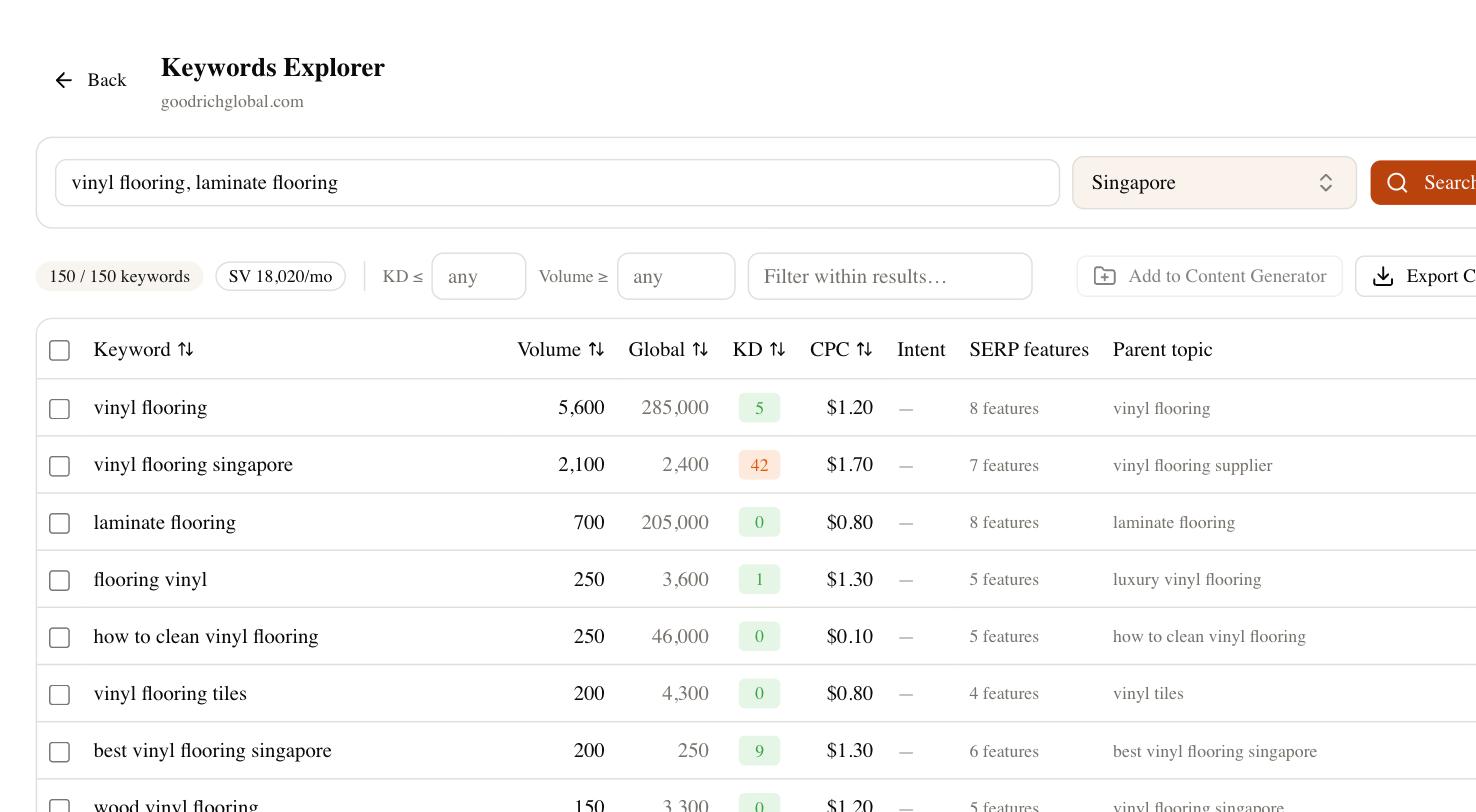
From there, the AI writing side drafts localized descriptions in your voice, Brand Radar shows whether AI answer engines mention your app when people ask for tools like yours, and rank tracking watches how your listing performs in Google web search. That covers the demand and web-visibility layer of SEO for Google Play — the part where standard search rules still apply — while your in-store signals stay where they belong, inside Play Console.