
Most guides on SEO for HubSpot are generic checklists with the word “HubSpot” pasted on top. This one is about the platform’s real controls — the settings that exist, the ones that don’t, and the places where HubSpot quietly does something you’d rather it didn’t. If you run marketing on HubSpot’s CMS, SEO for HubSpot is less about secret tactics and more about knowing exactly how far the platform bends before you have to work around it.
The short version: HubSpot is genuinely solid on the fundamentals — clean server-rendered HTML, per-page meta control, a real redirect tool, and an auto-generated sitemap. It gets awkward around structured data, template bloat, and the thin archive pages it creates without asking. Knowing which is which saves you from fighting problems that aren’t there and ignoring the ones that are.
URLs, blogs, and site structure
You have full control over the slug on any page or blog post — HubSpot lets you edit it in the page settings, and it will offer to redirect the old URL when you change it. Where it gets rigid is the blog. Each blog sits under a root path you set once (the default is /blog), and every post lives beneath that root. If you run two separate blogs, they become two separate structures with their own listing, tag, and author pages, which is more surface area than most sites need.
Connect a custom domain before you publish anything. HubSpot serves unconnected content on a hubspotpagebuilder.com subdomain, and you do not want that URL earning links or getting indexed. Decide subdomain versus subdirectory up front too: hosting the blog as a subdirectory of your main domain concentrates authority, and HubSpot supports it, but switching later means a wave of redirects you could have avoided.
Redirects done right
HubSpot’s URL Redirects tool is one of the better parts of the platform. You get standard 301s, plus flexible pattern redirects that match a URL prefix and pass the rest through — useful when you migrate a whole folder. It is not full regex, so complex rewrites still need thought, but for a normal site migration it handles the job without a developer.
The catch is that nothing forces you to use it. Change a slug, forget to check the redirect box, and you have created a 404 with no warning. After any structural change, pull a fresh crawl and confirm the old URLs resolve. This is the single most common self-inflicted wound on HubSpot sites.
Meta tags, canonicals, and indexing
On-page meta control is strong. Every page and post has fields for the title tag, meta description, and a featured image that feeds Open Graph, and you can set a custom canonical URL per page in the advanced options. HubSpot also auto-generates canonicals, which is helpful until it isn’t — the automatic canonical on a paginated or filtered blog listing can point somewhere you didn’t intend, so spot-check them.
Indexing control is thinner than you’d like. You can set a page to no-index through the advanced settings, and you can edit robots.txt directly in the settings. What you cannot easily do is bulk-manage the tag and author archive pages HubSpot spins up for every blog. Those pages are thin by nature, and left indexable they dilute your crawl budget. Decide early whether you want them indexed, and if not, no-index them deliberately rather than hoping Google ignores them.
Rendering and page speed
Here HubSpot is better than its reputation. Pages are rendered server-side from HubL templates, so the HTML Google receives is complete — you are not fighting the JavaScript-rendering problems that plague some headless and single-page setups. Content is in the source, links are crawlable, and that removes a whole category of technical risk.
Speed is where the platform gives with one hand and takes with the other. HubSpot serves assets over a CDN with automatic minification and lazy loading, which is a good starting point. Then the marketing scripts, chat widgets, and heavy drag-and-drop modules pile weight back on, and Core Web Vitals suffer. The fixes are ordinary: trim the tracking scripts you don’t use, compress images before upload, and be ruthless about how many modules a template loads. A lean HubSpot page is fast. A maximalist one is not, and that’s on the build, not the CMS.
Structured data — the manual part
This is HubSpot’s weakest SEO area, so say it plainly: there is no native schema generator for most page types. Blog posts get some basic markup, but if you want Article, FAQ, Product, or Breadcrumb schema, you add the JSON-LD yourself — either in a custom HTML module or in the page’s head HTML. It works, and it’s stable once in place, but it’s hand-coding, and on a large site that means a template edit rather than a checkbox. Budget time for it instead of assuming the platform handles it.
The mistakes people make on HubSpot
The same handful of errors show up again and again. Run through this before you blame the platform:
- Leaving the test subdomain live — content indexed on
hubspotpagebuilder.cominstead of your real domain. - Slug changes with no redirect — the redirect tool exists; people just forget the checkbox.
- Indexable tag and author archives — thin pages Google didn’t need to see.
- Module and script bloat — a page that could be fast dragged down by widgets nobody uses.
- Assuming schema is automatic — it isn’t; it’s manual.
- Trusting HubSpot’s on-page score as strategy — the built-in SEO recommendations tool is a useful checklist, not a keyword or competitive research engine.
That last point matters most. HubSpot’s recommendations panel tells you a title is missing or an image lacks alt text. It does not tell you which keywords are worth targeting, what a competitor ranks for that you don’t, or whether your brand shows up in AI answers. For that you need real search data, and HubSpot doesn’t pretend to provide it.
Where SEO Rocket fits
HubSpot is your publishing and on-page layer; it is not your research layer. That’s the gap SEO Rocket fills. You ask, in plain language, what to target and get Ahrefs-grade keyword data — volume, difficulty, and the ideas your HubSpot content strategy tool can’t surface — then feed those decisions straight into your pages.
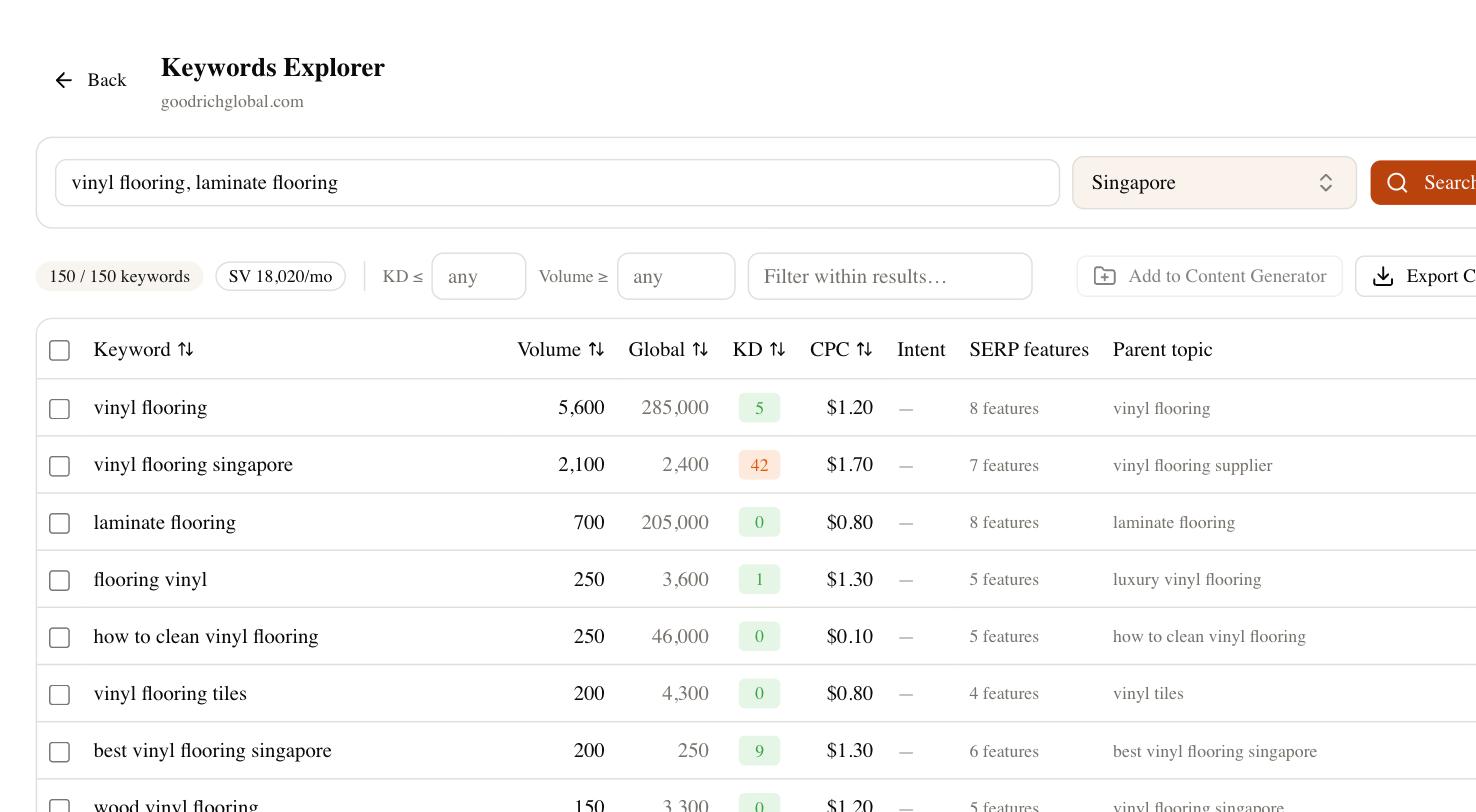
From there the same workflow runs the competitor gap, tracks where you rank, audits the site for the exact technical issues above, and checks whether AI search engines cite your brand — the questions HubSpot’s own panel was never built to answer. Use HubSpot for what it’s good at: fast, server-rendered, well-structured pages. Use a real data tool to decide what those pages should say. A clean checklist for doing effective SEO for HubSpot is short — control your URLs, redirect on every change, keep templates lean, add your own schema, no-index the thin archives — but knowing what to write comes from data the CMS doesn’t have.