
SEO for LinkedIn is a different game from SEO on your own website, and treating it like the same thing is why most profiles and company pages underperform. On your site you control the title tag, the canonical, the schema, the redirects, and the load time. On LinkedIn you control almost none of that — you get a handful of text fields and a custom URL slug, and everything else is decided for you.
That does not make SEO for LinkedIn pointless. It means the leverage sits in a narrow set of places, and knowing exactly which fields move the needle — inside Google and inside LinkedIn’s own search — is the whole skill. This guide walks through what you can influence, what you can’t, and where the real wins are.
You are optimizing for two different search engines
The first mistake is assuming there is one target. There are two. Google indexes public LinkedIn profiles, company pages, and long-form articles, so your name plus a keyword can surface a LinkedIn URL in ordinary web results. Separately, LinkedIn runs its own internal search, where recruiters, buyers, and prospects type “fractional CFO” or “shopify agency singapore” into the LinkedIn search bar and get a ranked list of people and companies.
These two engines reward different things. Google cares about your public headline, your custom URL, and whether the page is crawlable. LinkedIn’s internal search leans heavily on your skills, job titles, About section, and connection graph — it also weights how complete your profile is and how active you are. Optimize for only one and you leave half the traffic on the table. Most people accidentally optimize for neither, filling fields with vague titles that match nothing a real person would type.
What you actually control
Strip away the marketing and the list of levers is short. Here is the honest inventory of what you can and cannot touch on a personal profile.
| Element | Control you have | SEO effect |
|---|---|---|
| Custom URL slug (/in/…) | Full — you set it once, editable | Ranks in Google; your cleanest keyword real estate |
| Headline (220 chars) | Full | Acts as the title/description Google shows; heavy weight in LinkedIn search |
| About / Summary | Full | Body copy for LinkedIn’s internal match; partly shown in Google |
| Skills & job titles | Full | Primary signals for LinkedIn internal search |
| Meta tags, canonical, schema | None | Set by LinkedIn; you cannot edit them |
| Page speed & rendering | None | LinkedIn’s problem, not yours |
| Redirects | None | Change your slug and the old URL simply breaks |
| Outbound link equity | None | Every link on LinkedIn is nofollow |
Read that table twice. The top four rows are your entire on-page toolkit. Everything below the line is fixed by the platform, so stop trying to influence it and pour your effort into the fields you can edit.
The highest-leverage moves
Start with the custom URL. New profiles get a slug with random digits on the end; change it to linkedin.com/in/firstname-lastname or a clean brand variant. That URL is what Google indexes, and a tidy, keyword-adjacent slug reads better in results and is easier to share. Set it early, because changing it later breaks every link pointing at the old one.
Then rewrite your headline. It is the single most valuable field because it doubles as your Google snippet and as a top-weighted term in LinkedIn search. “Marketing Director” wastes it. “B2B SaaS Growth | Demand Gen & SEO for Series A Teams” front-loads the terms buyers actually type. Put your most important keyword in the first 60 or so characters, since that is what shows before the truncation.
Your skills section is the quiet workhorse for internal search. LinkedIn matches queries against listed skills, so add the exact terms your audience uses and get endorsements on the two or three that matter most. Mirror the same phrases in your About section and your job titles so the signals reinforce each other rather than scatter. The first line of your About also shows in search previews, so lead with the outcome you deliver, not a childhood anecdote.
Where LinkedIn’s SEO genuinely falls short
Be clear-eyed about the ceiling. LinkedIn links are nofollow, which means a link to your website from your profile, a company page, or an article passes no ranking authority. It can drive real referral traffic and brand searches, but it will not lift your domain the way an editorial backlink does. Anyone selling “LinkedIn backlinks” for SEO is selling you nothing.
You also can’t set meta tags, canonicals, or structured data, so if LinkedIn renders your page in a way you dislike, you have no override. There is no way to add a redirect, no control over crawl directives, and no access to load-time fixes. Regular feed posts are a further limit: they sit behind infinite scroll and inconsistent indexing, so treat them as reach and engagement plays, not as pages you expect to rank in Google.
Company pages versus personal profiles
Company pages follow the same rules with a few extra fields. The tagline behaves like a headline, the About section carries your keywords, and the “specialties” style fields feed LinkedIn’s internal matching. Public company pages are indexable, so a search for your brand name usually surfaces the page near the top — worth claiming and completing even if you never post.
Personal profiles almost always outrank and out-engage company pages, though. LinkedIn’s system favors people over logos, so if you are choosing where to invest, a well-optimized founder or team profile typically returns more than a polished but faceless company page. Do both, but weight your time toward the humans. A common pattern that works: a complete company page for brand searches, and two or three sharp personal profiles doing the actual reach.
Do LinkedIn articles and newsletters rank?
Long-form LinkedIn articles get their own URLs and are server-rendered enough to be crawled, so they can appear in Google — but they rank as LinkedIn pages, not as pages on your domain. That is the trade. You borrow LinkedIn’s authority for a piece you don’t own, and you send any link equity nowhere useful. For thought-leadership visibility that is fine; for building your own site’s rankings, publish on your domain first and repurpose to LinkedIn second.
Newsletters add a subscription and notification layer that boosts distribution, which is a real advantage for reach. Just keep the SEO expectation honest: they help you get seen inside LinkedIn and occasionally in Google, not build authority you can bank elsewhere.
Pick the right keywords, then reuse them everywhere
All of this depends on targeting terms people actually search, and guessing is where most profiles go wrong. Pull real search demand before you write a single field, so your headline, skills, About, and company tagline all point at phrases with genuine volume rather than the jargon you use internally.
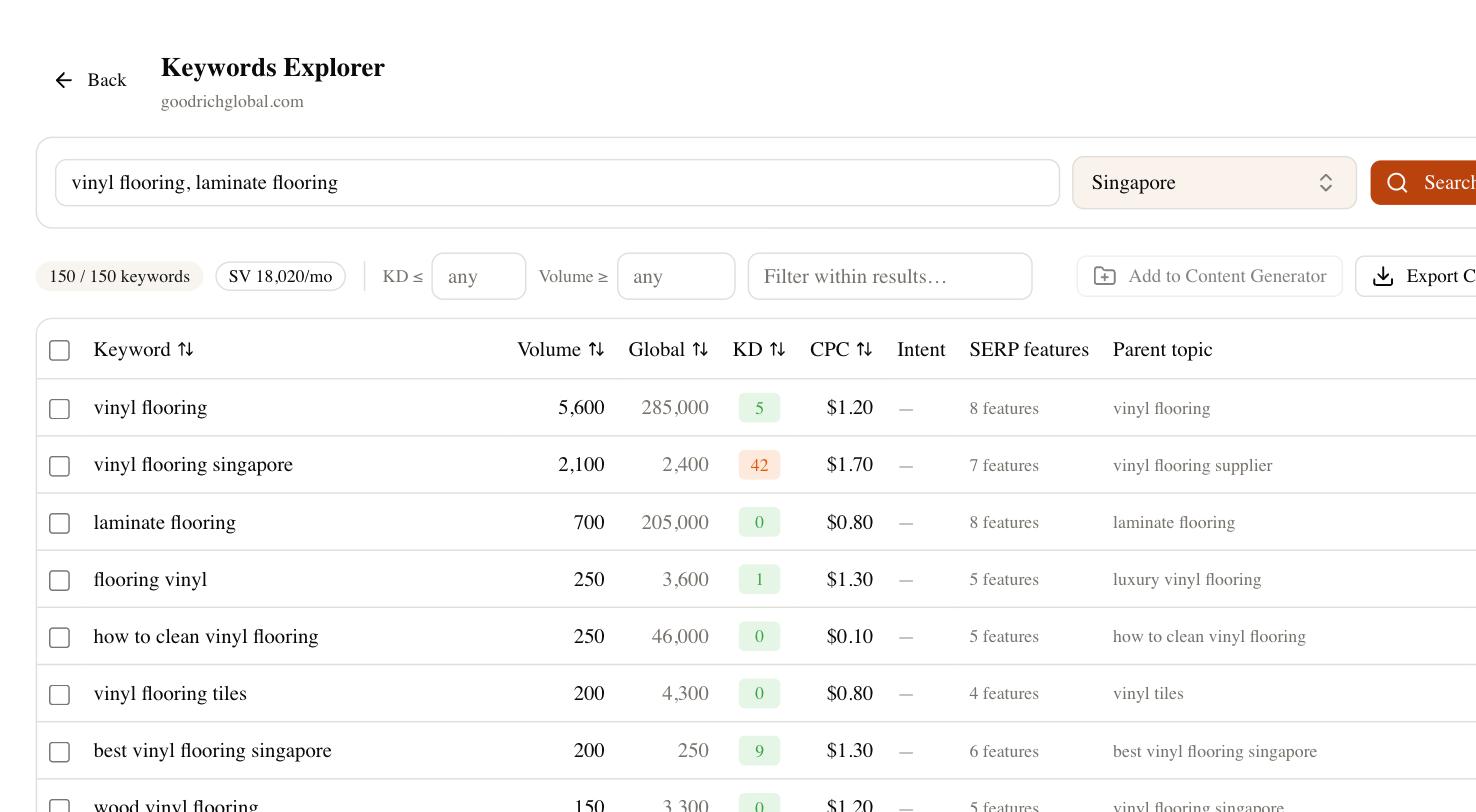
This is where SEO Rocket fits into a LinkedIn workflow. Ask it in plain language for the keywords around your niche and it returns ideas with real volume and difficulty, so you can see which phrases are worth claiming in your headline and which are dead ends. You can then use it to draft the supporting site content those LinkedIn links point back to — the pages that can actually rank and pass authority. LinkedIn wins you attention; a keyword-led profile plus owned content turns that attention into search traffic you keep.