
SEO for Notion is a different game than SEO on WordPress or Webflow, and pretending otherwise is how people waste months. Notion was built as a docs-and-wiki tool, and its web publishing was bolted on afterward, so SEO for Notion means working inside a fairly narrow set of controls — some of which you’d take for granted anywhere else simply don’t exist.
That doesn’t mean Notion pages can’t rank. Plenty do, especially for informational and long-tail queries where a clean, well-structured document is exactly what the searcher wants. But you have to know which levers you actually control, which ones are missing, and where the platform quietly works against you. This guide is specific to Notion — real settings, real constraints — not generic advice with the word “Notion” pasted in.
What “publishing” on Notion really does
When you toggle Publish on a page (Share → Publish), Notion serves it at a notion.site URL. The default URL is ugly: your workspace name plus the page title plus a long hexadecimal page ID. You can edit the slug portion, which is the first thing most people never do. If you want a real website — navigation, a custom domain, multiple pages tied together — you use Notion Sites, the newer layer that turns a page and its subpages into a browsable site.
The critical thing to understand is how Notion renders. A published page is a JavaScript application that fetches your content and paints it in the browser. Google can render JavaScript, but it does so on a delay and not always completely, so your content is never as reliably crawlable as flat server-rendered HTML. That single architectural fact sits underneath most of Notion’s SEO limitations.
What you genuinely control
The list is shorter than on a real CMS, but it’s not nothing. On a published page or a Notion Site you can set the SEO title and meta description, choose a social preview image, and toggle whether search engines are allowed to index the page at all. Notion auto-generates a sitemap for Sites and serves a robots file, so discovery mostly takes care of itself.
Inside the content, you have more power than people realize. Your page title becomes the H1. Heading blocks map cleanly to H2 and H3, so a properly outlined document gives Google a tidy heading structure for free. You can add alt text to images through the caption, link internally between pages, and nest subpages to create a logical URL hierarchy. Custom domains are supported on paid plans, which matters because you never want to build authority on a notion.site subdomain you don’t own.
Where Notion honestly limits you
Here’s the part other guides skip. Several standard SEO controls simply aren’t available, and no amount of cleverness inside Notion changes that. If your strategy depends on any of these, Notion is the wrong host and you should know that before you commit.
| SEO control | Notion native support | What it means for you |
|---|---|---|
| URL slug | Editable, but no folder logic | Clean up the default hash-ID URL manually on every page |
| Meta title & description | Yes (Sites / page settings) | Set these deliberately — don’t accept the defaults |
| Page speed | Poor, not tunable | Heavy JavaScript bundle; slow LCP you can’t optimize away |
| JavaScript rendering | Client-side only | Content depends on Google rendering JS to be seen |
| Structured data (schema) | None | No FAQ, Article, or Product rich results |
| 301 redirects | None | Change a slug and you break links with no redirect |
| Canonical tags | Not controllable | Duplicate-content risk if the same page lives in two places |
| Custom head code / analytics | Limited | Hard to add verification, scripts, or advanced tracking |
The two that bite hardest are speed and the missing redirects. Notion pages are slow because you’re shipping a whole app to render a document, and Core Web Vitals is a real ranking input. The redirect gap means Notion is unforgiving about URL changes — rename a page and every existing link to it dies, with nothing to catch the traffic.
The highest-leverage moves that actually work
Play to the platform’s strengths and it can punch above its weight. Notion is excellent at clean, deeply structured long-form content, so target informational and how-to queries rather than competitive commercial terms where speed and schema decide the winner. Lock your URLs early and don’t rename them, because you can’t redirect. Write a deliberate SEO title and description for every published page instead of letting Notion default them. Use one clear H1 and a logical H2/H3 outline — Notion makes this easy and Google rewards it.
Then do the keyword work outside Notion, because Notion tells you nothing about demand. Find the questions your audience actually searches, check volume and difficulty, and build each page around one primary intent. That research is where a tool like SEO Rocket earns its place, which we’ll get to.
Should you use a wrapper like Super or Potion?
Third-party services such as Super, Potion, and Simple.ink proxy your Notion content and serve it as fast, server-rendered HTML on your own domain, while adding the controls Notion lacks — custom head code, better meta handling, sometimes basic schema, and analytics. For a marketing site or a content blog where organic traffic is the point, a wrapper solves the two worst problems: rendering and speed. You keep writing in Notion; visitors and crawlers get real HTML.
The trade-off is another subscription and another moving part, and you’re still ultimately editing in a doc tool. If SEO is central to the project, the honest answer is often that a proper CMS is a better home. But if you’re committed to Notion, a wrapper is the single biggest upgrade you can make.
Platform-specific mistakes people make
Most Notion SEO failures come from the same handful of errors. People publish on the raw notion.site subdomain and build authority they can never move. They leave the ugly default URLs in place, keyword-and-hash noise and all. They rename pages freely and quietly break every inbound link. They expect rich results from FAQ or how-to content that has no schema to power it. And they never check whether Google has actually rendered and indexed the JavaScript content — which, on Notion, you should verify by hand.
The fix for that last one is simple: run a live URL inspection in Google Search Console and look at the rendered HTML, not the source. If your content isn’t in the rendered output, no on-page tweak matters until that’s solved.
Where SEO Rocket fits in a Notion workflow
Notion is your editor; it is not your SEO brain. The work that decides whether a Notion page ranks — finding real queries, sizing demand, sizing difficulty, and seeing what already ranks — happens before you write a word, and Notion offers none of it. That’s the gap SEO Rocket fills. Ask it in plain language for keyword ideas around your topic and it returns real volume and difficulty on Ahrefs-grade data, so you build each page around a query people actually search instead of guessing.
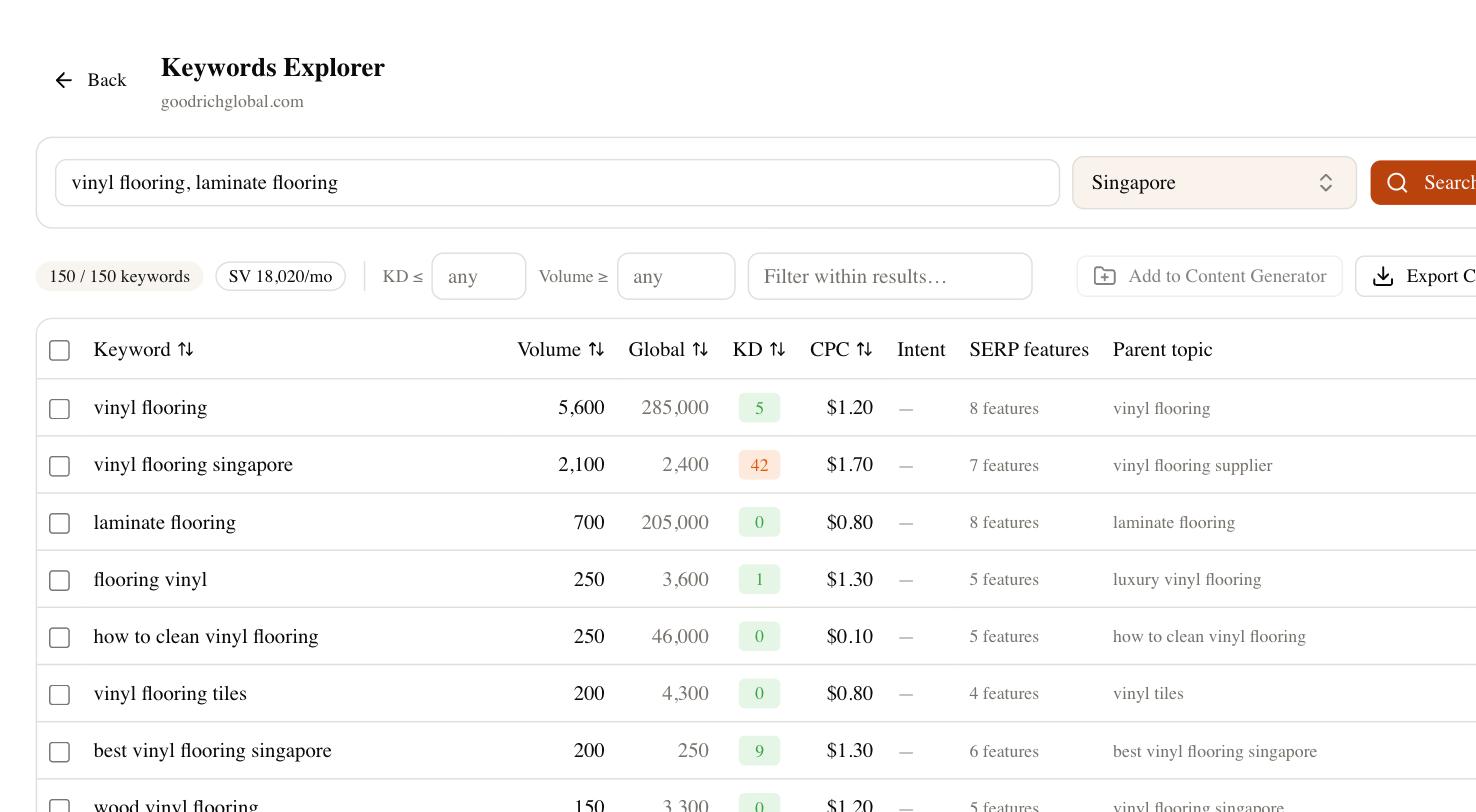
From there the same tool covers what Notion can’t see: rank tracking to confirm your slow-loading pages are still climbing, a competitor gap to find topics you’re missing, and Brand Radar to check whether AI answers cite you at all. Draft the article with the built-in AI writer, paste it into Notion, and publish. You get the writing comfort of Notion with the research and monitoring it will never have — which is the realistic way to do SEO for Notion without pretending its limits don’t exist.