
SEO for portfolios is a different job from ordinary website SEO, and most portfolio owners lose ground because they treat it like a blog. A portfolio is image-heavy, text-light, and usually built on a drag-and-drop tool that hides half the settings that matter. That combination fights almost everything search engines reward, so the wins come from a short list of specific moves rather than generic advice.
The good news: because so few creatives do this well, a little effort goes a long way. This guide covers what makes SEO for portfolios genuinely different, what your builder actually lets you control, and the highest-leverage changes that move a photographer, designer, or developer site up the results.
Why portfolios are hard for search
Search engines rank text. Portfolios show pictures. A gorgeous case study that lives entirely inside a full-bleed image gives Google almost nothing to read, so it ranks for almost nothing. On top of that, many portfolio builders — Framer, Cargo, Adobe Portfolio, and single-page Webflow templates — render content with JavaScript and cram everything onto one scrolling page. One page means one URL, one title tag, and one shot at ranking, no matter how many projects you have shipped.
The other structural problem is thin text. A project page that reads “Brand identity, 2025” and shows twelve images has no words for a query to match. You are asking to rank for “sustainable packaging design” while the page never says either phrase in plain, crawlable text. Search engines can index images, but they rank the words around them far more reliably, and a portfolio that skips the words competes with one hand behind its back.
There is a discovery problem too. Most people find creatives through a name, a referral, or a marketplace — not a search box — so portfolio owners rarely get feedback that their site is invisible. You can be booked solid and still rank nowhere, which means the fix only pays off once you decide search should be a channel rather than an afterthought.
What you actually control (it depends on your builder)
Before you optimize anything, find out what your platform will let you change. Control over URLs, titles, meta descriptions, and redirects varies wildly, and it dictates what is even possible.
| Capability | Custom / Webflow | Squarespace | Adobe Portfolio / Behance |
|---|---|---|---|
| Editable URL slugs | Full | Good | Limited |
| Per-page title & meta | Full | Good | Minimal |
| Custom structured data | Full | Workarounds | None |
| 301 redirects | Full | Built-in tool | None |
| Image alt text | Full | Full | Partial |
If you are on Adobe Portfolio or Behance, be honest with yourself: you are renting space with little SEO control, and no amount of effort changes a locked title tag. For anything you plan to build a business on, a platform with per-page meta control and clean URLs — Webflow, Squarespace, or a custom site — is worth the move.
Give every project its own page with real text
This is the single biggest win in SEO for portfolios. Break the one-page site into individual project pages, each on its own URL, each with a descriptive slug like /work/riverside-cafe-branding. Then write 150 to 300 words of genuine text per project: the client, the problem, what you made, the materials or stack, and the result. That prose is what ranks — and it is the difference between a page a search engine can read and a wall of pictures it skips.
Write for the phrases people actually search. A designer should name the discipline (“packaging design,” “restaurant brand identity”); a developer should name the stack; a photographer should name the genre and city (“Austin wedding photographer”). You are not stuffing keywords, you are simply describing the work in the words your buyers use. One clear sentence stating what the project is, for whom, and where beats a page of adjectives every time.
The image problem: speed and alt text
Portfolios are the slowest sites on the web because owners upload full-resolution exports. A 6 MB hero image tanks your Largest Contentful Paint, and page speed is a ranking factor and a bounce factor at once. Export images at the size they display, compress them, and serve modern formats like WebP. Most builders resize automatically, but they rarely compress hard enough — check your real load time, do not assume.
Alt text is your second lever. Every image needs a short, honest description of what it shows, both for accessibility and because it is often the only text on an image-driven page. “Matte black coffee packaging with copper foil logo” tells search engines what the picture is; “IMG_4821.jpg” tells them nothing. Skip the temptation to repeat the same phrase on every image — describe each one for what it actually is, and let the variety do the work.
Structured data that fits creative work
Schema markup helps search engines understand a page, and portfolios have natural fits most people ignore. Add Person or Organization schema on your about page, ImageObject for key images, and CreativeWork for individual projects. If you take on client work locally, LocalBusiness schema with your city matters more than any of these. On Webflow or a custom build you can add JSON-LD directly; on Squarespace you inject it via code blocks; on locked platforms you simply cannot, which is another reason control matters.
Platform-specific mistakes to avoid
The same handful of errors show up on nearly every portfolio. Run through this checklist against your own site.
- One long scrolling page. It caps you at a single URL. Split it into real project pages.
- Text baked into images. Your headlines and captions live inside JPEGs, so search engines can’t read them. Use real HTML text.
- Empty title tags. Half of all portfolios ship with “Home” or the template default as the title. Write a specific one per page.
- Lightbox-only galleries. If a project’s story only appears after a click into a JavaScript overlay, crawlers may never see it.
- No internal links. Link related projects to each other so crawlers — and clients — can move through your work.
- Ignoring the redirect when you rename a project. Changing a slug without a 301 turns an old link into a dead end.
Where SEO Rocket fits
You still need to know which phrases are worth targeting before you rewrite a single project page. SEO Rocket’s Keywords Explorer shows the terms your discipline gets searched for, with real volume and difficulty, so you name projects around demand instead of guessing.
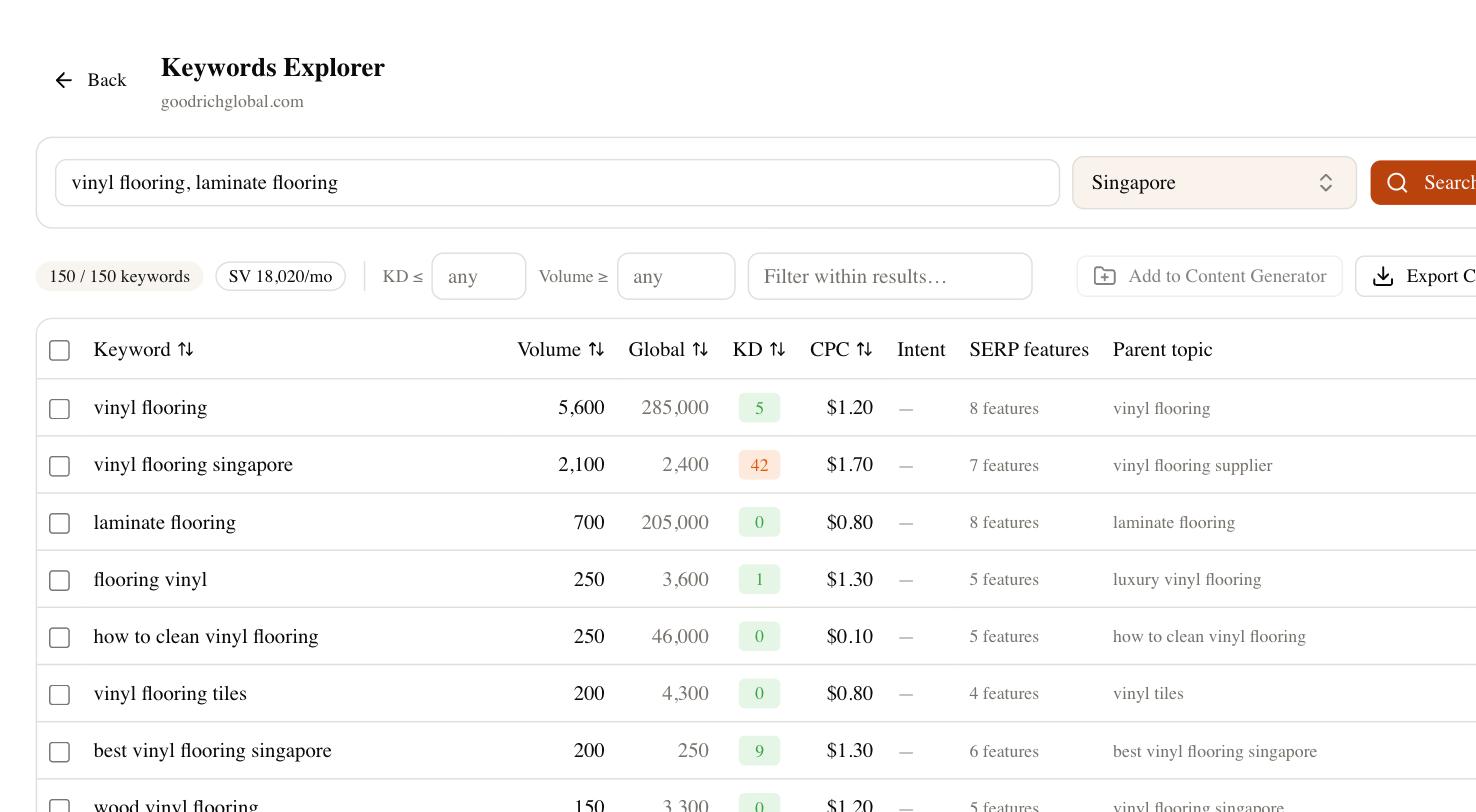
From there the site audit flags the exact portfolio problems above — bloated images, missing titles, thin pages, broken redirects — and rank tracking tells you whether your new project pages are actually climbing. If you serve a local market, competitor gap shows which terms rival studios rank for that you do not, and Brand Radar tells you whether AI search tools mention you when someone asks for a designer or photographer in your niche.
A realistic place to start
Do not rebuild everything this week. Pick your three strongest projects, give each its own URL with 200 words of real text and proper alt tags, compress every image on those pages, and write a specific title tag for each. That alone puts you ahead of most creative sites. Then check your rankings a month later — positions move slowly and jitter a few spots day to day, so judge the trend, not a single reading. Add one more project each month with the same treatment, and within a couple of quarters you have a body of pages earning search traffic instead of one page earning none. Done consistently, this is what turns a beautiful portfolio into one people can actually find.