
SEO for SaaS websites is a different job than SEO for a local business or a store, and treating it the same way is why most SaaS blogs plateau. A SaaS site is really three sites stitched together — a marketing site, a product logged in behind auth, and usually a docs or help section — and each one behaves differently for search engines. Get the split wrong and Google either can’t see your best pages or ranks the wrong ones.
This guide covers what makes SEO for SaaS websites genuinely different: how your stack renders, where feature and comparison pages win or die, the subdomain-versus-subdirectory decision that quietly caps a lot of sites, and the concrete moves that pay off. No generic checklist — the specific constraints SaaS teams actually hit.
The rendering problem: your app is invisible, and sometimes your marketing site is too
Most SaaS products are built on React, Vue, or a similar JavaScript framework, and the app behind login is correctly walled off from search — that part is fine. The problem is when the same client-side rendering leaks onto pages you do want indexed. If a feature page or a programmatically generated landing page ships as an empty HTML shell that only fills in after JavaScript runs, Google will crawl it, queue it for rendering, and often index a thinner version than a visitor sees.
Check this the blunt way: view the page source (not the inspector) and search for your actual body copy. If the headline and paragraphs aren’t in the raw HTML, they’re being rendered client-side. Server-side rendering or static generation for every public marketing and content page is not optional for SaaS — it’s the baseline. Keep the JavaScript framework for the logged-in product where it belongs, and serve real HTML for anything you want ranked.
Feature pages are your money pages, and most are too thin
A SaaS company’s highest-intent keywords are its features and use cases — “invoice automation software,” “help desk for Shopify,” “time tracking for agencies.” These convert far better than blog traffic because the searcher already wants the category. The mistake is treating a feature page as a design exercise: a hero, three icons, a demo button, and eighty words. Google reads that as thin, and a competitor with 900 words of genuine explanation outranks you on your own feature.
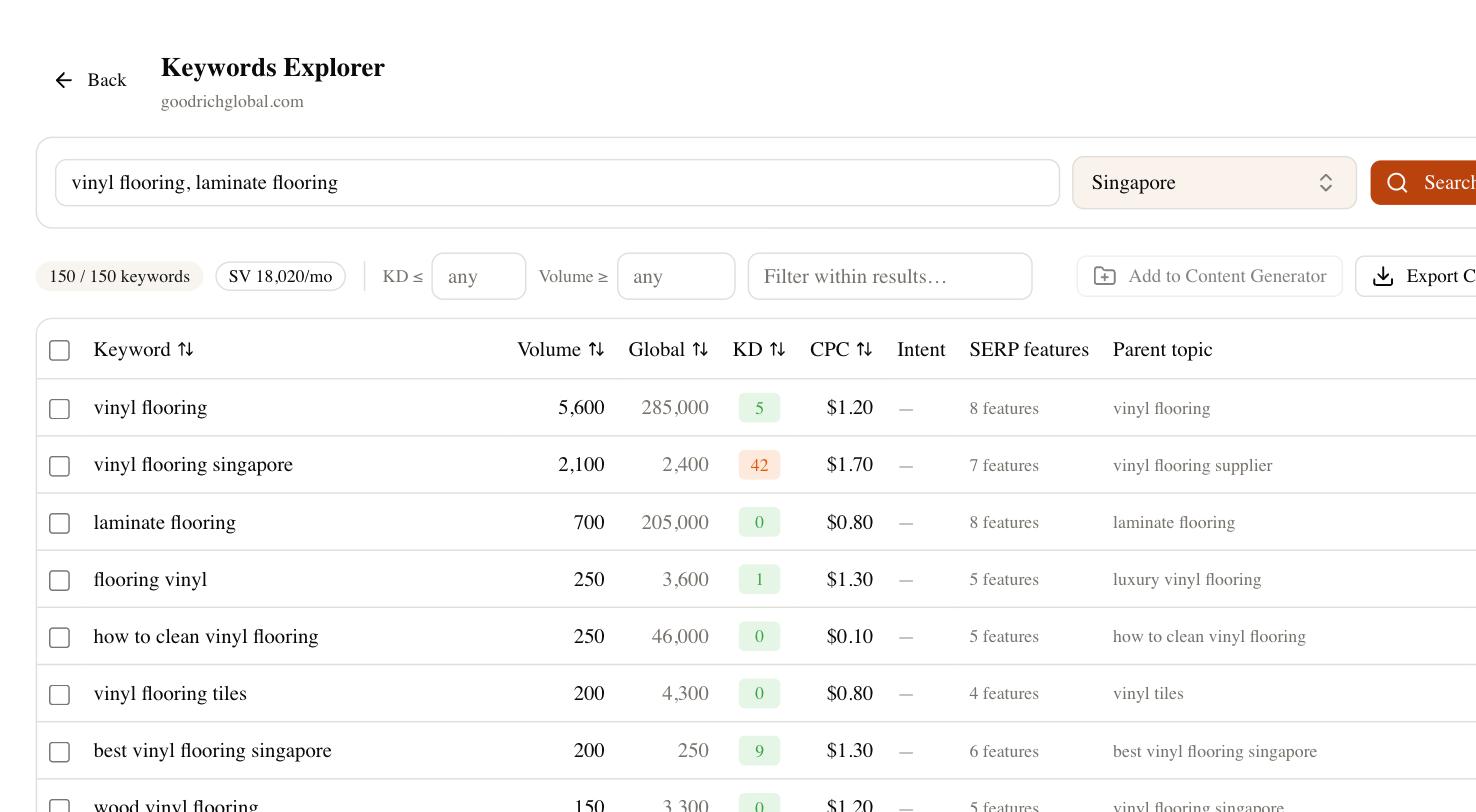
Every feature and use-case page needs enough substance to answer the query fully — what the feature does, who it’s for, how it works, what it replaces, and honest limits. Build one page per real use case rather than one bloated page trying to rank for everything. This is also where you’ll compete against comparison and alternatives pages, so knowing which terms have volume and how hard they are matters before you write.
The subdomain versus subdirectory trap
This is the single most common structural mistake in SEO for SaaS, and it’s usually inherited from an engineering decision. Your blog lands on blog.yoursaas.com, your docs on docs.yoursaas.com, your help center on a hosted subdomain from a third-party tool. Each subdomain is treated by Google as a partly separate site, so the authority your content earns doesn’t fully flow back to the pages that sell the product.
Where you have the choice, keep content in subdirectories on the main domain — yoursaas.com/blog, yoursaas.com/guides — so every link and every ranking page compounds into one domain’s strength. Hosted help centers and docs platforms often force a subdomain; when they do, at least reverse-proxy them onto a subdirectory if your infrastructure allows it. The difference in how content authority accrues is real and it grows over time.
Programmatic pages: leverage and landmine
SaaS is one of the few models where programmatic SEO genuinely works — integration pages (“connect X to Y”), template galleries, location or industry variants, comparison pages against every competitor. Done well, one template spawns hundreds of pages that each catch a long-tail query. Done badly, you generate a thousand near-duplicate pages, Google indexes a fraction, and the thin ones drag on the rest.
The rule is one real, differentiated reason for each page to exist. An integration page that just swaps two product names into boilerplate is doorway spam; one that actually explains the specific workflow between those two tools earns its spot. Before you scale a template, validate that the pattern has search demand at all — a template targeting keywords nobody searches just adds crawl bloat.
Technical settings SaaS teams control (and the ones they don’t)
Because you own the stack, you have more control than a Shopify or Wix user — but that control cuts both ways. Here’s where SaaS sites usually need to look:
- URLs — full control. Keep them short and readable; kill the query-string parameters that framework routers sometimes leave on public pages.
- Meta tags and titles — full control, but SSR frameworks sometimes render defaults on the server and swap the real ones client-side. Verify the correct title is in the raw HTML.
- Page speed — the big JavaScript bundle that powers your app should never load on a marketing page. Split it; ship the content page lean.
- Structured data — add SoftwareApplication, FAQ, and BreadcrumbList schema where they fit. SaaS sites underuse this.
- Redirects — you control these, so audit them. Rebrands and pricing-page moves leave chains that bleed authority.
- Canonicals — programmatic and filtered pages create duplicates; set canonicals deliberately, not by default.
The genuine limitation is coordination. Marketing wants a page live; engineering owns the deploy; the docs live in a third-party tool nobody wants to migrate. Most SaaS SEO problems are org-chart problems wearing a technical mask.
Where SEO Rocket fits a SaaS workflow
The parts of this that eat time are research and production. You need to know which feature and comparison keywords are worth a page before you brief a writer, and you need to see whether your programmatic template is targeting real demand. SEO Rocket runs that research on Ahrefs-grade data from a chat prompt — volume, difficulty, and competitor gaps — then drafts the page with Claude so a feature page ships with real substance instead of eighty words.
It also tracks the newer surface that matters for SaaS specifically: buyers now ask ChatGPT and Perplexity “what’s the best tool for X,” and a page that ranks first on Google can be absent from that answer. Brand Radar shows whether your product gets cited in AI search, competitor gap finds the feature and alternatives pages you’re missing, and the site audit catches the rendering and redirect issues above. For agencies running several SaaS clients, the client dashboards hand each one a live view without an export.
A short checklist to start
If you do five things this quarter, do these. Move your blog and docs to subdirectories where you can. Server-render every public page and confirm your copy is in the raw HTML. Rewrite your top three feature pages to actually answer the query. Add SoftwareApplication and FAQ schema to your product and pricing pages. And audit your redirect chains after any rebrand or pricing change. None of these is glamorous, but together they fix the structural drag that keeps most SaaS sites from ranking for the terms that pay. The content strategy on top only works once the foundation underneath it is sound.