SEO for Pinterest is not the same job as ranking a page on Google, and treating it like one is why most efforts stall. Pinterest is a visual search engine that happens to look like a social network, so SEO for Pinterest lives almost entirely inside the handful of fields Pinterest lets you fill — not in the technical levers you’re used to pulling on your own website.
That distinction matters because half the advice online is generic SEO with the word “Pinterest” pasted on top. This guide sticks to what the platform actually lets you control, where it doesn’t, and the moves that reliably earn impressions in the feed and in Pinterest’s own search.
Pinterest is a search engine, not a blog
People come to Pinterest to look for things: recipes, outfits, room layouts, wedding ideas, product inspiration. They type a query into the search bar or tap a guided-search suggestion, and Pinterest returns Pins ranked by relevance and quality. The upside is that a good Pin keeps surfacing for months, long after a social post would have died. The catch is that the ranking signals are Pinterest’s, and most of them are hidden.
Pinterest weighs four rough buckets: domain quality (is the site behind the Pin trustworthy and claimed), Pin quality (saves, clicks, and freshness), pinner quality (is your account active and topically consistent), and topic relevance (does your text match the search). You influence all four indirectly. You never see a score, and Pinterest never publishes the weighting, so anyone selling you a precise ranking formula is guessing. What you can do is stack the odds by feeding every signal you’re allowed to touch.
What you can and can’t control
This is the part that trips up people coming from traditional SEO. On your own site you own the URL, the meta tags, the page speed, the rendering, the redirects, the schema. On Pinterest you own almost none of that. Here’s the honest split.
| Lever | Can you control it on Pinterest? |
|---|---|
| Pin URL (pinterest.com/pin/ID) | No — auto-generated, no custom slugs |
| Meta tags / canonical / robots | No — Pinterest owns the page markup |
| Page speed & JavaScript rendering | No — Pinterest renders everything |
| Redirects | Only the outbound destination link on a Pin |
| Pin title (up to ~100 characters) | Yes |
| Pin description (up to ~500 characters) | Yes |
| Alt text on the image | Yes |
| Board name & board description | Yes |
| Profile name, username, bio | Yes |
| Structured data (Rich Pins) | Yes — but only on your own website |
Read that table twice. Everything in the “No” column is standard technical SEO, and none of it is yours to touch. Everything in the “Yes” column is text and structured data. That tells you exactly where to spend your time: metadata and the source markup on your site.
Claim your site and turn on Rich Pins
The single highest-leverage technical move happens off Pinterest, on your own domain. Claiming your website in Pinterest’s business settings ties every Pin from your domain back to your account, unlocks analytics, and feeds the domain-quality signal. It’s a one-time meta tag or DNS record, and skipping it is the most common mistake I see.
Rich Pins go a step further. If your pages already carry Open Graph and schema.org markup — article, product, or recipe types — Pinterest reads that structured data and pulls live details onto the Pin: current price, in-stock status, headline, ingredients. You validate a sample URL once through Pinterest’s Rich Pin validator, and from then on your Pins stay in sync with your site automatically. When you drop a price on a product page, the Pin updates without you lifting a finger. This is the one place where the structured-data skills from regular SEO transfer directly, so if your site already has clean schema, you’re most of the way there. If it doesn’t, fixing your markup helps your Google results at the same time, so the work pays twice.
The metadata that actually ranks
Because the technical levers are locked, your titles and descriptions do the heavy lifting. Write them for a searcher, front-load the phrase people actually type, and describe the image plainly. A title like “Small Balcony Garden Ideas for Renters” beats “Our Latest Blog Post” every time, because the first one matches a real query and the second matches nothing.
Board names and descriptions are underrated. A board called “Recipes” competes with a million others; “Easy Weeknight Vegetarian Dinners” tells Pinterest precisely what belongs there and helps every Pin inside it. Fill the board description with natural language, not a hashtag dump. Hashtags on Pinterest carry little weight now — a couple of relevant ones are fine, but they won’t rescue a vague description.
The trap here is guessing at phrasing. You want the words your audience genuinely searches, with real demand behind them, and that’s a keyword-research problem, not a copywriting one.
Where SEO Rocket fits
Pinterest hides its search volumes, but the intent overlaps heavily with Google — the person searching “capsule wardrobe checklist” on Pinterest is searching something close on Google too. So the fastest way to write Pin and board metadata that ranks is to pull real keyword data first, then work those exact phrases into your titles, descriptions, and board names.
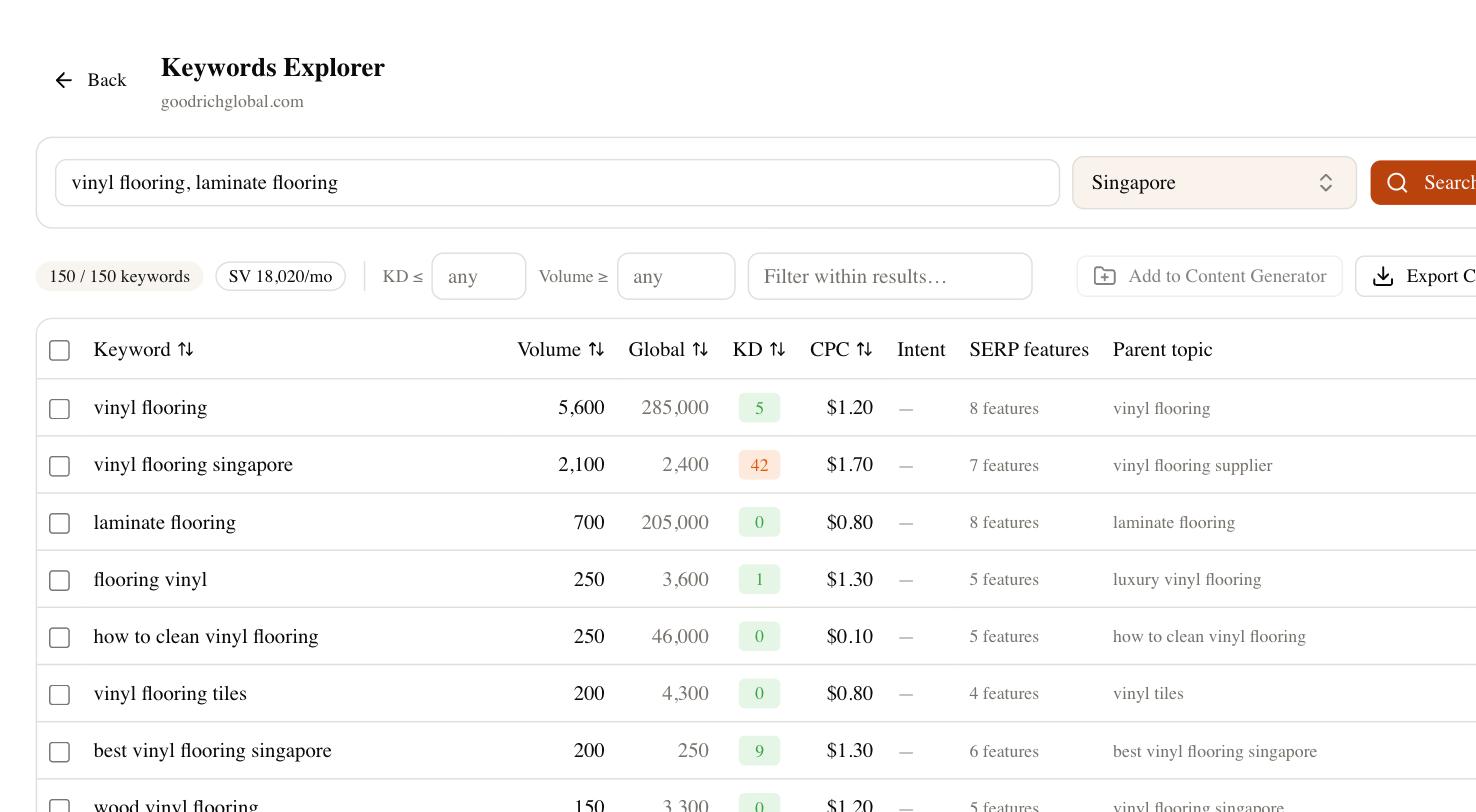
In SEO Rocket you ask the Keywords Explorer for ideas around your topic and get back phrasing with volume and difficulty attached. Use the long-tail, high-intent terms as your Pin titles and board names. Two honest caveats: those numbers reflect Google demand, so treat them as a strong proxy for Pinterest, not a literal count. And SEO Rocket does not track your position inside Pinterest’s own feed — no third-party tool truly can. What it does track is Google, and since Pinterest boards and Pins get indexed there too, you can watch your Pinterest URLs earn organic visibility in regular search as a second payoff.
Fresh Pins, images, and common mistakes
Pinterest rewards fresh Pins — new images pointing to a URL, not the same graphic saved over and over. Make several distinct Pins for one article with different images and different titles rather than repinning one asset. Use a 2:3 vertical ratio (1000×1500 works well), keep a short text overlay readable on mobile, and write real alt text describing the image.
The mistakes are predictable. People chase virality with clickbait titles that don’t match the destination, and Pinterest’s quality signals punish the bounce. They leave the account dormant for weeks, then dump twenty Pins in an hour. They forget to claim the site, so nothing ties back to their domain. And they copy generic technical-SEO checklists that assume control over URLs and meta tags they’ll never have here.
A realistic Pinterest SEO checklist
Keep this short and do it in order. Claim your website and verify it. Add or confirm Open Graph and schema markup so Rich Pins fire. Research the phrases your audience actually searches, then write Pin titles, descriptions, board names, and alt text around those exact terms. Publish fresh vertical images consistently instead of hammering repins. Give it a full season — Pinterest content compounds slowly, and a Pin that looks flat in week two can carry traffic a year later. Do those five things and you’ve covered the levers Pinterest actually hands you, which is the entire game.