
SEO for Instagram is a different job from ranking a website, and pretending otherwise wastes your time. You do not control URLs, title tags, meta descriptions, page speed, redirects, or structured data on Instagram — the platform owns all of it. What you optimize instead is a short list of fields Instagram actually reads, plus the separate question of whether Google can surface your profile at all. Treat SEO for Instagram as two search engines running at once: Instagram’s internal search, and Google indexing what Instagram lets it see.
The good news is that the fields that matter are few and easy to control. The catch is that most advice repeats desktop-SEO habits — schema markup, internal links, Core Web Vitals — that simply do not apply here. Below is what genuinely moves, what to ignore, and where the limits are real.
Why Instagram search isn’t Google search
Instagram’s search bar is a matching engine, not a ranking algorithm in the Google sense. When someone types a term, Instagram scans a narrow set of signals: the account name, the username, the bio, and — more recently — the words inside your captions and photo alt text. It does not crawl the open web, it does not weigh backlinks, and it does not read any HTML you wrote. There is no crawl budget, no canonical tag, no robots directive to manage.
That means the highest-leverage work is upfront and text-based. You are not trying to earn authority over months; you are trying to make sure the exact phrases your audience types appear in the handful of fields Instagram indexes. Relevance plus engagement decides who shows up, and relevance starts with words you place deliberately. There is a second layer on top of pure matching: once you clear the relevance bar, Instagram favors accounts and posts that already pull saves, shares, and watch time from people who searched similar terms. You cannot fake that, but you can make sure the right people find you in the first place by naming things the way they search.
What you genuinely can’t control
Honesty first, because it saves effort. On a normal site you would tune these levers, and on Instagram every one of them is locked:
- URLs — your profile is fixed at instagram.com/username and posts get an auto-generated ID like /p/Cx1a2b3c/. You cannot set a clean, keyword-rich slug.
- Title tags and meta descriptions — Instagram writes these for Google, not you. You can influence the words Google pulls, but not the tags themselves.
- Page speed and rendering — profiles are a JavaScript-heavy app. Google renders them, but you have zero control over load time or how much gets rendered.
- Structured data — no schema markup, no rich-result control.
- Redirects and canonicals — none available to you.
Stop spending energy on any of that. The wins live entirely in the text fields and the content itself.
The name field is your title tag
The single most underused lever is the Name field — the bold line under your profile picture — which is separate from your @username. Instagram weights it heavily in search, and most accounts waste it on a personal name or a brand alone. If you are a Kensington dog groomer, “Paws & Co.” earns nothing, while “Paws & Co. | Dog Grooming Kensington” tells Instagram exactly which searches to match you against.
Your username matters too, but you rarely want to change an established handle. So load the Name field with your category and location, keep it readable, and treat it the way you would treat an HTML title tag: one clear primary term, no keyword soup. You get 30 characters, so choose them like they cost money.
Captions and alt text are now searchable
For years captions were invisible to search. That changed — Instagram now indexes caption text, which makes your first sentence real estate, not decoration. Write the phrase a person would actually type near the front of the caption, in plain language, before any story or emoji. “Sourdough baking class in Austin this Saturday” beats “so excited to share something special.”
Alt text is the other quiet win. Instagram auto-generates alt text from image recognition, but you can override it under Advanced Settings when you post, or edit it afterward. Write a genuine description that happens to include your key term — it helps both accessibility and matching. Neither field rewards stuffing; a wall of keywords reads as spam to users and does nothing extra for the algorithm.
Hashtags do less than you were told
Hashtags are not the ranking engine they once were. Instagram itself has said keywords in captions now carry more discovery weight than tags, and it removed the ability to follow a hashtag. They still help categorize a post and can surface it in a tag feed, but piling on 30 broad tags is a dead habit. Use a small, specific set — a handful tied tightly to the post — and put your real effort into caption keywords instead.
The table below sorts the effort honestly, so you know where to spend a limited hour.
| Field | Do you control it? | Search impact | Move that works |
|---|---|---|---|
| Name field | Yes | High | Add category + location |
| Username | Yes | High | Keep it clean and stable |
| Bio | Yes | Medium | State what you do, plainly |
| Caption first line | Yes | Medium–High | Lead with the search phrase |
| Alt text | Yes | Medium | Describe the image accurately |
| Hashtags | Yes | Low–Medium | Few and specific, not 30 |
| URL / meta tags / speed | No | — | Ignore; you can’t touch it |
Getting your Instagram into Google
Public professional and business profiles are crawlable, so your Instagram can appear in a Google search — usually for your brand name, sometimes for a strong niche phrase. You influence what Google shows by putting your clearest description in the bio and Name field, since those are what Google pulls into the snippet. A private account, by contrast, is invisible to Google entirely.
Google will not treat a single post like a blog post, so do not expect long-tail articles to rank from Instagram. The realistic outcome is that your profile ranks for your own name and category, and that embeds or mentions of your posts on other sites give Google more reason to index them. If organic search traffic is a serious goal, Instagram supports it — it does not replace a site you actually own. Think of the profile as a branded result that reinforces your name, not as a page that will outrank your own website for the money terms. When someone Googles you after seeing a post, you want the profile to say clearly what you do, so keep the bio and Name field aligned with the same phrases you use everywhere else.
Where keyword research still fits
Even though you optimize different fields, you still need to know which phrases people type — and that is a genuine keyword-research question. The terms you feed into your Name field, bio, and caption openers should be ones with real demand, not guesses. Pulling volume and difficulty for your niche tells you whether to target “dog grooming Kensington” or a broader phrase, and which variations searchers actually use.
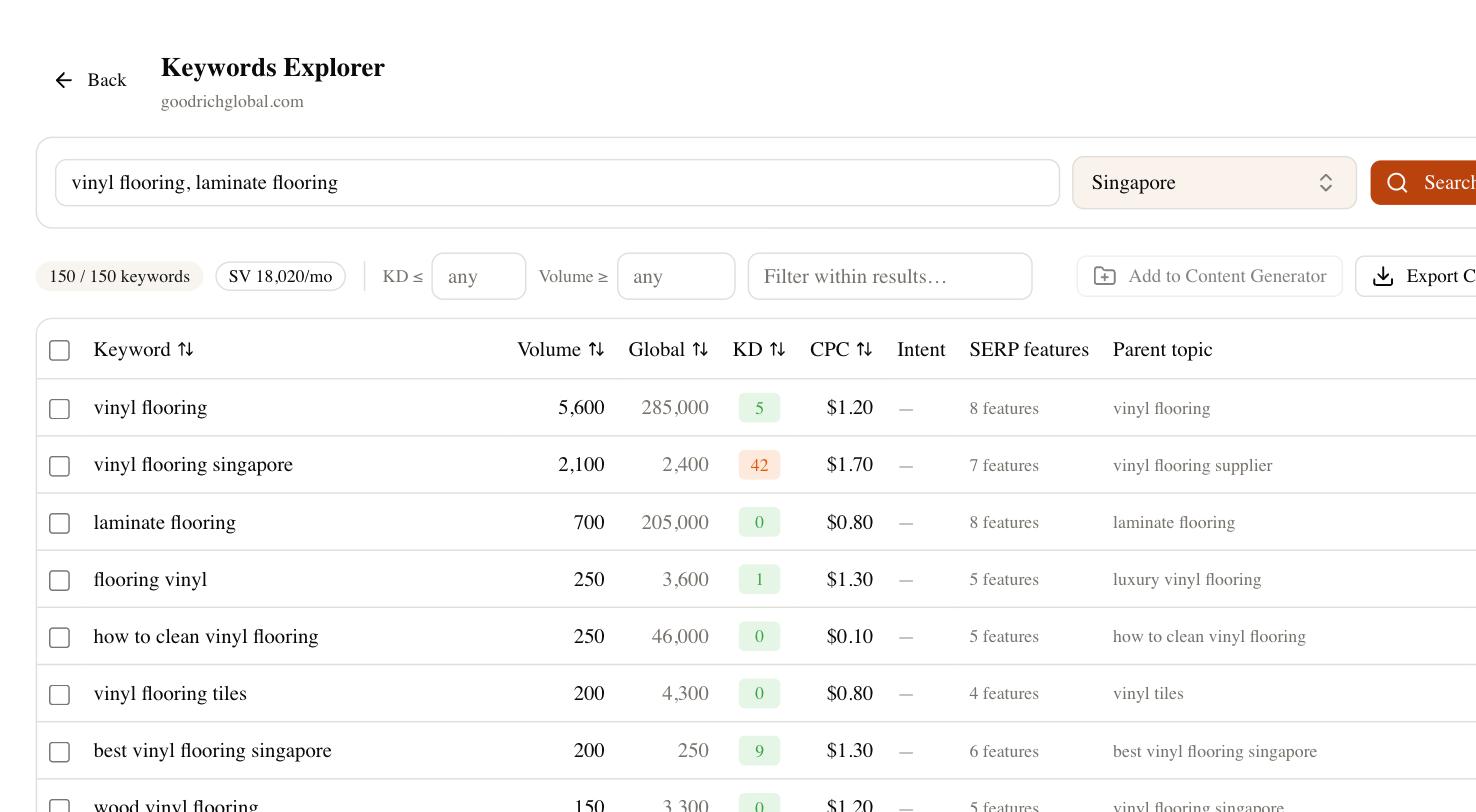
Inside SEO Rocket you can ask for keyword ideas around your niche in plain language and get back the same volume and difficulty data you would use for a web page — then reuse those phrases in the Instagram fields that matter. The competitor-gap and rank-tracking tools tell you which terms your rivals lean on and whether your own brand terms are getting picked up in Google and AI answers. The platform will not post to Instagram for you, but it removes the guesswork from what to write in the fields you do control. That is the honest scope of good SEO for Instagram: sharp keyword choices, applied to a small set of fields, backed by data instead of folklore.