
Most guides describe a topical map without ever showing you one, so here is a real topical map example you can copy today. This topical map example is a filled template for a home-espresso site — a pillar page, its supporting clusters, the target keyword for every page, the search intent behind it, and a rough difficulty band — laid out exactly the way I hand them to clients.
Read the table first, then use the checklist below it to rebuild the same structure for your own subject. The niche does not matter; the shape does. Whether you sell espresso machines, accounting software, or physiotherapy, the columns stay the same and only the rows change. You can have your own draft filled in before lunch.
What a topical map should contain
A topical map is not a keyword list with prettier formatting. A keyword list tells you what people search; a map tells you what pages you will build, in what relationship, to prove you cover a subject completely. The difference is the columns. Every row in a good map answers five questions at once, and if any column is blank the plan is not finished.
Here is what each column does. The page title is the article you will actually publish. The cluster groups related pages so they can link to each other and share authority. The search intent tells you whether the page informs, compares, or sells — and a single page cannot do two of those well. The primary keyword is the one query the page is built to win. The difficulty band is your honesty check: it stops you sequencing a two-year fight ahead of a reachable win.
A filled topical map example
Below is the worked example. The central topic is “make espresso at home,” the pillar sits at the top, and each cluster underneath it holds the supporting pages that link up to it. Copy this straight into a spreadsheet and swap the rows for your own subject — the structure is the part worth keeping.
| Page (article to publish) | Cluster | Search intent | Primary keyword | Difficulty |
|---|---|---|---|---|
| How to Make Espresso at Home | Pillar | Informational | make espresso at home | Medium |
| Best Espresso Machines Under $500 | Equipment | Commercial | best espresso machine under 500 | High |
| Manual vs Automatic Espresso Machines | Equipment | Commercial investigation | manual vs automatic espresso machine | Low |
| Do You Need a Grinder for Espresso? | Equipment | Informational | do you need a grinder for espresso | Low |
| How to Pull a Balanced Espresso Shot | Technique | Informational | how to pull an espresso shot | Medium |
| Espresso Grind Size Guide | Technique | Informational | espresso grind size | Medium |
| How to Steam Milk at Home | Technique | Informational | how to steam milk at home | Low |
| Why Is My Espresso Sour? | Troubleshooting | Informational | why is my espresso sour | Low |
| Why Is My Espresso Bitter? | Troubleshooting | Informational | why is my espresso bitter | Low |
| Best Coffee Beans for Espresso | Beans | Commercial | best coffee beans for espresso | High |
| Light vs Dark Roast for Espresso | Beans | Informational | light vs dark roast espresso | Low |
Notice what the layout tells you at a glance. The four low-difficulty troubleshooting and technique pages are where a new site should start, because they are winnable while your authority is still thin. The two high-difficulty commercial pages — the machine and bean roundups — are where the money is, but they need the surrounding cluster ranking first before they stand a chance. That sequencing decision falls straight out of the table without any extra analysis.
The checklist to build your own
Work through these steps in order. Each one feeds the next, and skipping ahead is how maps come out lopsided. You can do the first four with nothing but a blank document.
- Name the entity in one line. Write the single subject you want to own and how it earns money. “Espresso for home baristas” is a business; “coffee” is a hobby that will never rank.
- List 4 to 6 clusters from memory. Before touching data, write the areas a true expert would cover — here, equipment, technique, troubleshooting, and beans. This keeps breadth honest.
- Attach a primary keyword to each planned page. One query per page. If two pages want the same keyword, they are one page.
- Tag the intent. Mark every row informational, commercial, or transactional, and split any page that is trying to be two of them.
- Pull real volume and difficulty. Now bring in numbers so you know which clusters are reachable and which are a long fight.
- Sequence by difficulty, then value. Finish the low-difficulty pages inside a cluster first; publish the high-difficulty commercial page once its cluster is live.
The first four steps are strategy only you can do — no tool knows what your business should own. Steps five and six are the tedious data work, and that is the part worth handing off.
How to choose the pillar and target keywords
The pillar is the broadest page a beginner would land on and read end to end. In the example that is “make espresso at home” — wide enough to link down to every cluster, specific enough to actually rank. A pillar that is too broad (“coffee”) has nothing to anchor; one that is too narrow (“54mm portafilter tamping pressure”) is really a supporting page wearing a crown.
For the supporting keywords, favor the phrase real people type over the phrase that reads well in a title. “Why is my espresso sour” looks clumsy, but it is exactly what a frustrated home barista searches at 7 a.m., and matching that wording is half the battle. Benchmark each target against the weakest page currently on page one, not the strongest — if a thin forum thread is ranking, that is a gap you can beat, and the difficulty band should reflect that reality rather than the scariest result in the top ten.
How SEO Rocket fills the map for you
The two data-heavy steps — real volume and difficulty, and finding the clusters you missed — are where SEO Rocket does the grinding. Because it is chat-first, you describe your topic in plain language and it pulls keyword volume and difficulty from Ahrefs-grade data, so the difficulty column in your table stops being a guess. Ask it to filter to queries under a difficulty of 30 and it hands back the winnable rows for a new site.
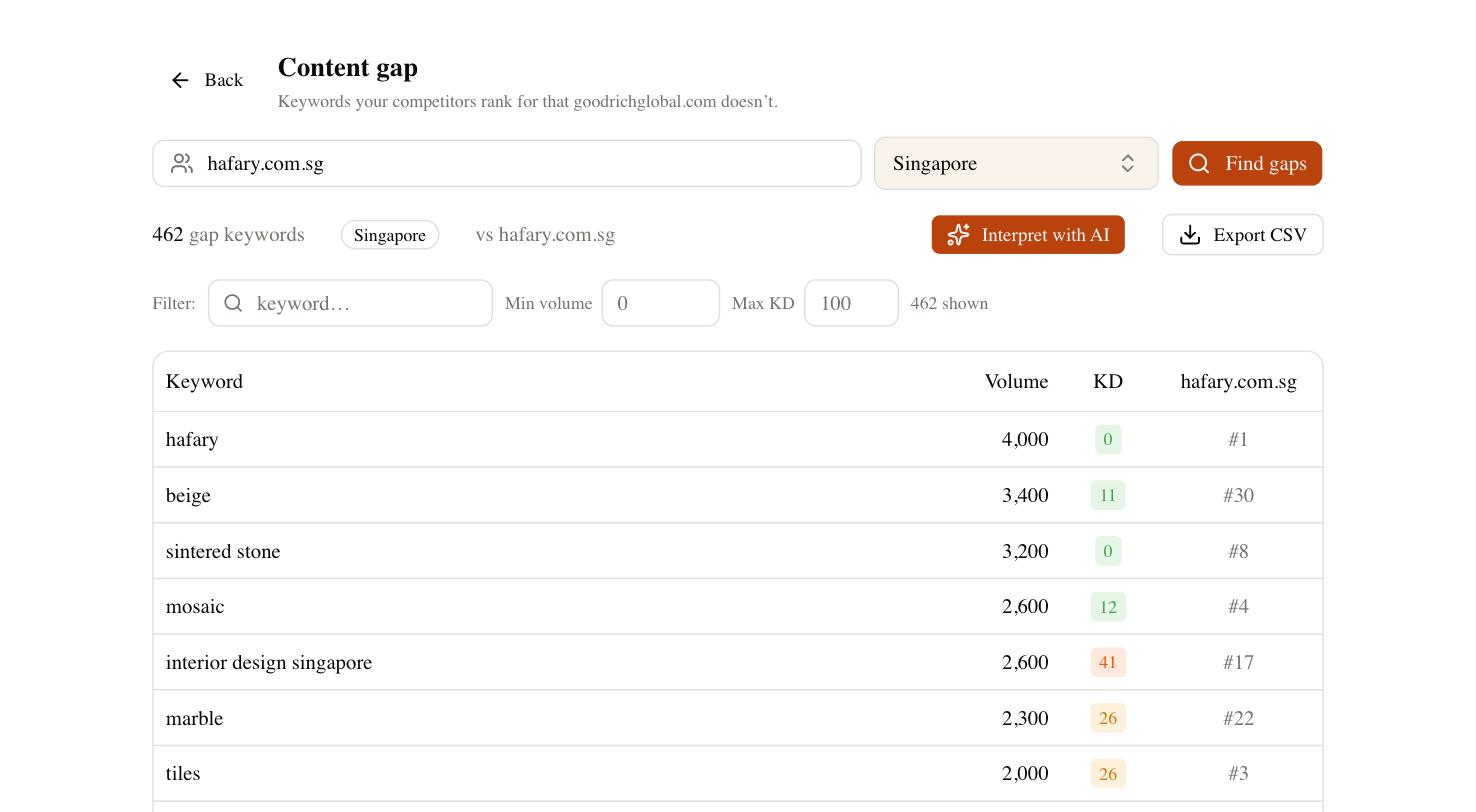
The bigger help is catching the clusters you forgot. Point its Content Gap tool at your domain and two competitors and it returns the keywords they rank for that you do not, already grouped — so instead of a flat keyword dump you see whole subtopics missing from your map, each with volume and difficulty attached. In the espresso example it might surface a “descaling and maintenance” cluster you never listed. SEO Rocket will not draw the map for you, and it should not; the strategic calls stay yours. What it removes is the hour of tab-juggling that usually kills the exercise before the map is finished.
Common mistakes this example avoids
Three failures show up in nearly every weak map, and the template above is built to dodge all of them. The first is stapling two intents onto one URL — a page that tries to explain espresso and sell a machine serves neither, which is why the example keeps “how to pull a shot” and “best machine” as separate rows. The second is publishing one article from ten different clusters instead of finishing one cluster completely; authority compounds within a cluster, so scatter kills it.
The third mistake is quiet cannibalization. When you write two thin pages that should have been one strong page, they split their own signals and both stall. Before you add a row, check that it fills a real gap rather than duplicating something you already planned. When in doubt, merge the two ideas and go deeper on one page — a single thorough article beats two half-answers every time.
From example to your own map
You now have a complete, copyable structure and a six-step checklist to refill it. Do not wait until the whole map is perfect to start writing — name your entity, draw one cluster in full, pull real numbers for it, and finish that cluster before chasing the next. Get the first one ranking and the second comes faster, because the site around it is already stronger.
A last note of honesty, the same one I give every client: the map is an afternoon of work, but the rankings take months. New pages bounce around for weeks before they settle, and a competitive cluster can take three to six months to mature. The map does not make any single page rank faster — it makes the whole effort compound, so every article you publish strengthens the ones beside it instead of standing alone.