
App store optimization is SEO with most of the levers removed. If you come to it from the web, the first thing to accept is that app store optimization gives you almost none of the technical controls you rely on for Google — no URLs to structure, no title tags to rewrite, no page speed to tune, no schema markup, no redirects, no crawlable HTML you own. You are optimizing inside Apple’s and Google’s storefronts, on their rendering, with a fixed set of fields they let you fill in.
That sounds limiting, and it is. But it also means the work is unusually concentrated: a handful of fields and signals decide almost everything. Get the metadata, the keyword targeting, and the conversion story right, and you have done most of the job. This guide covers what those fields actually are on the App Store and Google Play, where the two platforms diverge, and the honest limits you cannot engineer around.
Why the App Store isn’t Google
On the open web, ranking is a technical and editorial exercise: crawlability, internal links, Core Web Vitals, structured data, and a page you fully control. Inside an app store, none of that exists. Apple and Google run closed search engines over their own catalog. They index the fields you submit, weight them against download velocity and engagement, and render every listing through their own layout. You cannot change the URL, add a canonical tag, or ship a faster page.
The practical upshot is that ranking factors collapse into two buckets: relevance (does your metadata match the query) and quality (do people install, keep, and rate the app). There is no third bucket for clever technical SEO, because you do not own the page. That constraint is what makes the discipline feel narrow — and why the few things that do move the needle matter so much.
There is one more difference worth naming: intent. A large share of store searches are navigational — people typing a brand name they already know. Category and problem searches exist, and they are where you compete, but the pool is smaller and more literal than web search. That pushes you toward exact, plain-language terms over the long, question-shaped phrases you might chase on Google. Nobody types a full sentence into the App Store search bar.
What you cannot control (the honest limits)
Before the tactics, it helps to be clear about the ceiling. These are levers you have on the web and simply do not have here:
- URL and site structure — the store assigns your listing URL. There is nothing to optimize.
- Meta tags and headings — no title tag, no meta description, no H1s. You get named fields with hard character caps instead.
- Page speed and rendering — the storefront renders your listing. You cannot influence load time or layout.
- JavaScript, redirects, canonical tags — none apply. There is no crawler to guide.
- Structured data — you cannot add schema. The store already knows the object is an app.
- Backlinks as a direct in-store factor — external links drive traffic and can help, but they are not a listed ranking signal the way they are on Google.
If a tactic depends on owning the HTML, it does not exist in the store. Accept that early and you stop wasting time looking for controls that were never there.
The metadata that actually ranks
Almost all of your relevance comes from a small set of text fields, and the two platforms treat them differently. This is the single most important thing to get right, because keyword placement here is what makes you eligible to appear at all.
| Field | Apple App Store | Google Play |
|---|---|---|
| App name / title | Up to 30 characters, heavily weighted | Up to 30 characters, heavily weighted |
| Subtitle / short description | Subtitle, 30 characters, indexed | Short description, 80 characters, indexed |
| Keyword field | Dedicated 100-character field, hidden from users | None — no separate keyword field |
| Long description | Not indexed for keywords | Indexed — keyword density matters |
The big divergence sits in that table. Apple gives you a private 100-character keyword field and largely ignores your long description for ranking, so you pack targeting into the name, subtitle, and that comma-separated field. Google Play has no keyword field but does read the long description, so you write naturally and let your primary terms appear a few times without stuffing. Do not repeat a word across Apple’s fields to try to boost it — Apple deduplicates, and you have wasted characters you could have spent on another term.
Ratings, reviews, and conversion: the signals people ignore
Metadata gets you eligible; behavior decides where you land. Both stores lean hard on quality signals that have no web equivalent in the same form: your average rating, review volume and recency, install-to-view conversion rate, and retention. A listing that ranks for a term but converts poorly will slide, because the store reads low conversion as a weak match.
This is where your screenshots, preview video, and first three lines of copy do real ranking work indirectly — they lift conversion, and conversion feeds ranking. Prompt for reviews at a genuine moment of value inside the app, respond to reviews (both stores surface developer replies), and treat a wave of one-star reviews after a bad release as an SEO emergency, not just a support one. On the web you would never let a slow page sit; here, a sagging rating is the equivalent leak.
Install velocity matters too, and it is easy to misread. A burst of downloads after a launch or a feature spot can lift you for a term temporarily, then fade as the surge passes. Do not confuse that spike with a durable ranking win. The listings that hold position are the ones with steady, organic install rates and reviews that keep arriving — signals you build over weeks, not signals you buy in an afternoon.
Keyword research still comes first
Whatever the platform, you cannot target terms you have not researched, and store search boxes give you thin data. The workflow that works is to build a keyword pool the same way you would for the web — demand, difficulty, and intent — then map the winners into the fields each store gives you. High-volume, buyer-intent terms belong in the name and subtitle; the long tail goes into Apple’s keyword field or Google’s long description.
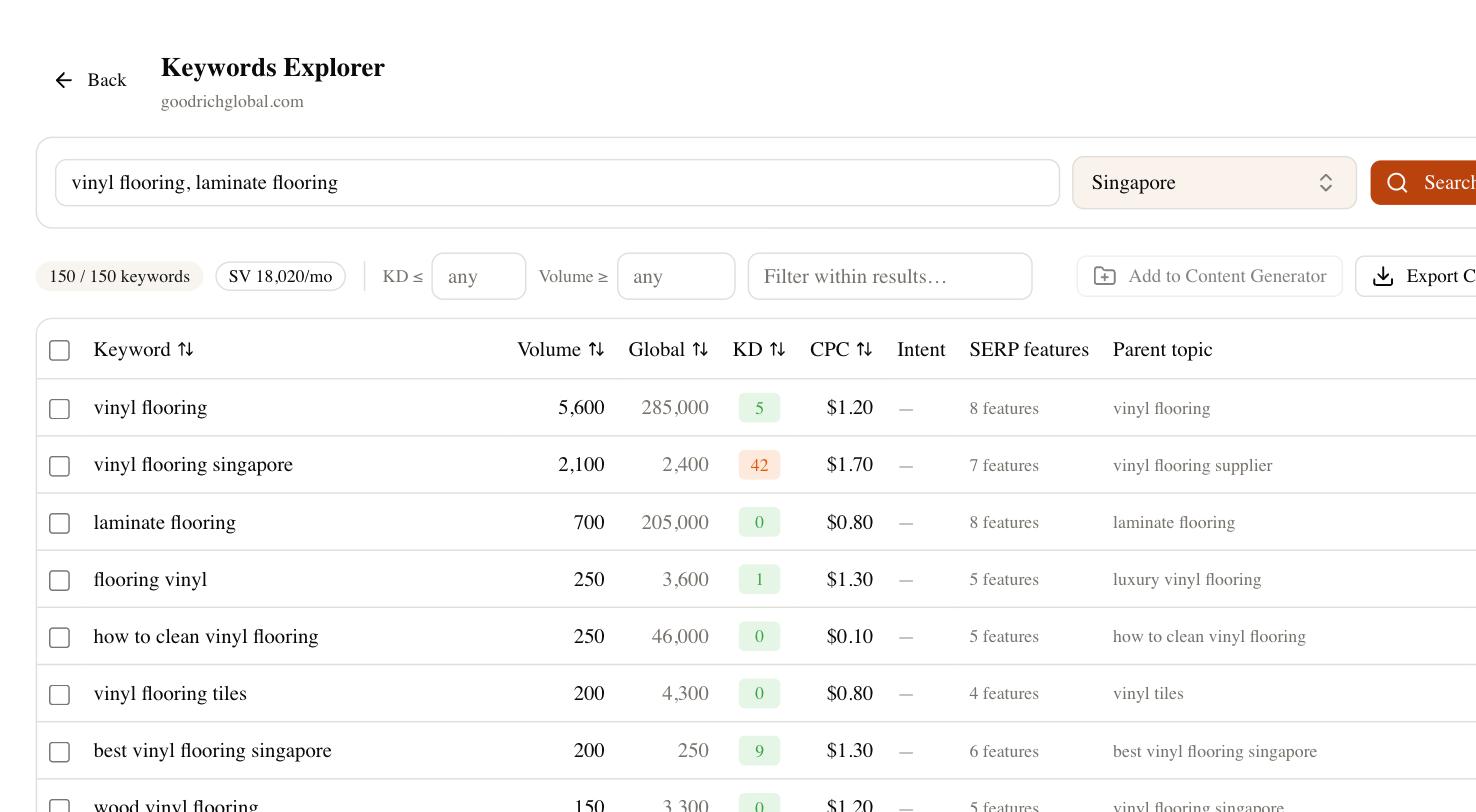
This is where a proper research tool earns its place even though the store is a closed system. In SEO Rocket you can pull keyword ideas with real volume and difficulty, size the demand behind each term, and check how competitors phrase their positioning before you commit your 30 characters. You are not scraping the App Store; you are doing the demand research that store search boxes hide, then placing those terms deliberately. Rank tracking then tells you whether a metadata change actually moved you, which the stores’ own dashboards report slowly and incompletely.
Platform-specific mistakes to avoid
Most listings lose installs to the same handful of errors, and almost all of them come from treating the store like a web page.
- Keyword stuffing the Apple description — it is not indexed for ranking, so cramming terms there only reads badly and risks rejection.
- Repeating words across Apple fields — deduplicated, so you burn characters for zero relevance gain.
- Using spaces in Apple’s keyword field — use commas with no spaces; every space is a wasted character out of your 100.
- Ignoring localization — each store locale is a separate index. Adding localizations, even for English variants, opens new keyword slots you are otherwise leaving empty.
- Chasing installs that do not retain — buying low-quality traffic tanks your conversion and retention signals and can hurt ranking more than doing nothing.
- Rewriting metadata constantly — changes take time to settle and Apple ties keyword updates to app version submissions. Change deliberately, then measure across a full cycle.
A practical ASO checklist
Strong app store optimization is repeatable. Work through this before your next release and you will have covered the levers that actually exist:
- Research a keyword pool with real volume and difficulty, then rank terms by intent.
- Place your strongest term in the app name, the next in the subtitle or short description.
- Fill Apple’s 100-character keyword field with comma-separated, non-duplicated terms.
- Write Google Play’s long description naturally, letting primary terms appear a few times.
- Design the first two screenshots and the preview to sell in the visible area before any tap.
- Build a review prompt into a real moment of value, and reply to reviews you receive.
- Add every locale you realistically serve, each with its own targeted metadata.
- Track rankings and conversion after each change, and judge across a full release cycle, not a day.
None of this needs a technical trick, because there is no page to trick. The stores reward the thing that is genuinely hard to fake: an app people search for by name and category, install because the listing is convincing, keep because it works, and rate because they mean it. Do the research, place the words with intent, and protect your conversion — that is the whole job, and it is enough.