
SEO for Amazon is not SEO the way you learned it for Google. There are no backlinks to build, no meta description to write, no URL to shape, and no page-speed score to chase. You are optimizing inside a closed marketplace where the search box is Amazon’s, the algorithm rewards sales more than words, and most of the levers you are used to pulling simply do not exist.
That does not make SEO for Amazon easier — it makes it a different discipline with a small number of controls that matter enormously and a lot of noise that does not. This guide covers what you actually control, what you have to give up, the signals that genuinely move a listing, and where a Google-and-AI-search tool like SEO Rocket fits into a seller’s wider plan.
Why Amazon search is a different animal
On Google, relevance is judged mostly by content and links, and a great page can rank before it earns a single sale. Amazon flips that. Its search engine — long known as A9, now more of an A10-style blend — is built to sell. It ranks the products most likely to convert a shopper into a buyer, because Amazon earns when you sell, not when you rank. So text relevance gets you into the consideration set, and then conversion history decides where you actually land.
The practical consequence is blunt: a keyword-perfect listing with poor reviews, a weak main image, or an uncompetitive price will lose to a plainer listing that converts. You are optimizing a sales page that happens to be indexed, not a document that happens to sell. That reframing changes your whole priority list. On Google you might spend a week on content and links; on Amazon the same week is better spent testing a main image, tightening a price, or fixing the thing that stalls buyers at checkout, because every one of those actions feeds the ranking loop directly.
What you control, and what you don’t
The honest starting point is knowing which knobs exist. Amazon hands you a short list and takes the rest off the table entirely. There is no editing the ASIN-based URL, no canonical tag, no schema you inject, no control over how the page renders, and no redirects when you retire a listing.
| Classic SEO lever | On Amazon? | What you actually get |
|---|---|---|
| Page title | Partly | A product title field with a category character limit, not a free-form tag |
| Meta description | No | Amazon writes the snippet; bullets and description are on-page, not meta |
| URL structure | No | Fixed /dp/ASIN path — no slugs, no folders, no keywords in the URL |
| Backend keywords | Yes | Search Terms field, roughly 250 bytes, invisible to shoppers |
| Structured data | No | Amazon controls all markup; you cannot add your own |
| Redirects / canonicals | No | No 301s; duplicate listings must be merged, not redirected |
| Rendering / JavaScript | No | Amazon renders the page; A+ Content is not indexed for search |
Read that last row twice. A+ Content — the rich brand modules many sellers pour money into — improves conversion, but its text is generally not indexed for Amazon search. Treat it as a closing tool, not a ranking one.
The signals that actually move a listing
Because conversion drives rank, the signals that matter cluster around whether shoppers buy after they land. Sales velocity for a given keyword is the big one — recent, keyword-attributed sales tell Amazon you deserve that query. Click-through rate from the search grid feeds it, which is why the main image and price do heavy SEO work even though neither is text.
Reviews, rating, in-stock status, Prime eligibility, and Buy Box ownership all feed the same loop. Run out of stock and your rank decays; win the Buy Box back and it recovers. This is the part sellers coming from Google underestimate: the operational health of the listing is a ranking factor, not just a merchandising one.
The highest-leverage moves that work
Start with keyword discovery in real buyer language — the exact phrases shoppers type, not the clever ones you would write. Front-load your single strongest keyword in the title within the category limit, then use the bullets to cover secondary terms while staying readable. Fill the backend Search Terms field completely: no repeats, no commas needed, no words already in your title, and never a competitor’s brand.
Then work the conversion side deliberately, because that is where rank is won. Get the main image right against a white background, price to stay competitive, and build review volume honestly. Sponsored Products campaigns are the accepted way to jump-start velocity on a new listing — the sales they generate feed the same organic signal, so paid and organic are not separate games here. Watch your search-term reports as the campaigns run: the queries that convert in paid are the exact terms worth reinforcing in your title and backend, and the ones that spend without selling are terms you should stop targeting rather than optimize harder for.
Mistakes that quietly suppress your listing
The most common error is treating the title like a keyword dumping ground. Amazon has cracked down on stuffed, unreadable titles, and an over-optimized title can get suppressed from search entirely. Repeating the same keyword across title, bullets, and backend wastes bytes without adding coverage — Amazon indexes a term once.
Other quiet killers: putting competitor brand names in your backend terms (against policy and easy to detect), chasing high-volume head terms your product converts poorly for, and expecting A+ Content to rank you. Sellers also forget that going out of stock resets hard-won velocity, so inventory planning is part of your SEO plan whether you like it or not.
Where Amazon SEO meets Google — and SEO Rocket
Here is the honest boundary: SEO Rocket does not optimize inside Amazon’s A9. It is a Google-organic and AI-search tool, and that is exactly the layer most Amazon sellers neglect. Your product pages, your brand site, and your comparison content can all rank in Google, where the classic levers you lost inside Amazon come back — and where a growing share of buyers now start with ChatGPT or Google’s AI Overviews before they ever reach the marketplace.
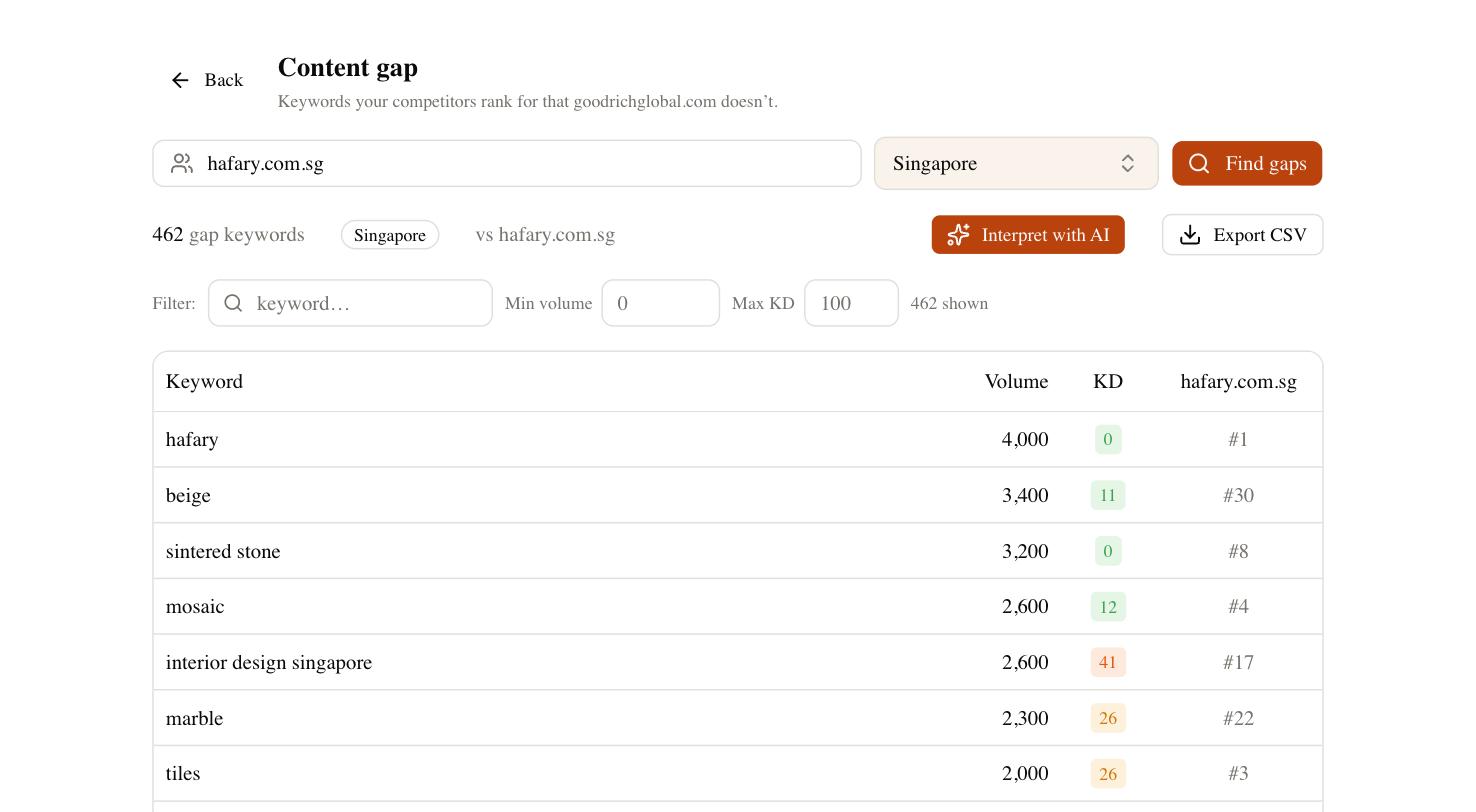
This is where the tools earn their place. The Content Gap report shows the buyer keywords your competitors capture on Google that you miss — the same demand you are fighting for inside Amazon, viewed from the open web where you can actually build pages to win it. Rank tracking watches those positions over a full cycle, and Brand Radar checks whether AI answers cite your brand when someone asks for a product like yours. None of that touches your ASIN, and that is the point: it captures the demand before it lands on Amazon.
A practical Amazon SEO checklist
Keep this short list on the wall and work it in order. Most listings that underperform fail on the boring items, not the clever ones.
- Research keywords in real shopper language; pick one primary term per listing.
- Front-load the primary keyword in the title, within the category character limit.
- Cover secondary terms in readable bullets — no stuffing.
- Fill the backend Search Terms field with no repeats and no brand names.
- Fix the main image and price first; they drive the click that drives rank.
- Build reviews honestly and never let the listing go out of stock.
- Use Sponsored Products to seed velocity on new ASINs.
- Skip trying to rank A+ Content; use it to convert, not to index.
- Run your brand and product terms through Google and AI-search tracking separately.
Amazon rewards products that sell, in that order — indexed, then converting, then ranked. Get the text right once, then spend your ongoing effort on the conversion signals that actually move you, and use the open web to capture the buyers who have not typed your product into Amazon yet.