The best SEO Chrome extensions aren’t the ones with the longest feature list — they’re the ones you actually open every day without thinking. A good extension pulls a number you’d otherwise dig for and drops it right on the page you’re already looking at, whether that’s a live SERP, a competitor’s homepage, or your own draft. That’s the whole job.
This roundup covers the best SEO Chrome extensions that earn a permanent spot on the toolbar, what each one is genuinely for, and where a browser overlay stops being enough. Some are free, some sit on top of a paid subscription, and one of them isn’t an extension at all — but it belongs in the conversation, and we’ll be straight about why.
What a Chrome extension actually does for SEO
Extensions are surface tools. They live in the browser, so they’re brilliant at the quick, in-context question: what’s this page’s title tag, what’s this domain’s authority, how many words is this article, which keywords is this SERP built around. You get the answer in one click, without leaving the tab. That immediacy is their entire value — and also their ceiling.
What they can’t do is the heavy lifting. A toolbar overlay won’t crawl your whole site, track hundreds of keywords over months, draft an article, or tell you whether ChatGPT cites your brand. For that you need a proper platform. The smart setup is to treat extensions as your dashboard’s eyes on the live web, and keep the deep work somewhere with real data behind it.
The best SEO Chrome extensions at a glance
Skim the table, then read the notes on the two or three that fit how you work. Price bands are rough on purpose — vendors change plans constantly, and several of these are free but pull data from a paid account.
| Tool | Best for | AI-native? | Standout strength | Rough price band |
|---|---|---|---|---|
| SEO Rocket | Consultants & agencies who want one AI workflow, not just an overlay | Yes — chat-first | Ahrefs-grade data + AI writing + AI-search visibility in one place | Low $ / entry-friendly |
| Ahrefs SEO Toolbar | Ahrefs subscribers checking on-page & SERP metrics live | No | On-page report plus SERP metrics from the Ahrefs index | Free (needs Ahrefs plan for full data) |
| MozBar | Fast domain and page authority checks | No | DA/PA overlay right on the SERP | Free (more with Moz Pro) |
| Detailed SEO Extension | Quick on-page structure audits | No | One-click headings, meta, canonical and schema view | Free |
| Keywords Everywhere | Seeing search volume inline as you browse | No | Volume and related terms across Google and many sites | Low $ (credit-based) |
| SEOquake | Exportable SERP overlays and page audits | No | Configurable SERP data you can download | Free (ties into Semrush) |
| Wappalyzer | Spotting a site’s tech stack and CMS | No | Detects platform, frameworks and tools instantly | Free + paid tiers |
| SEO Minion | On-page checks and SERP previews | No | Broken-link and hreflang checking built in | Free |
SEO Rocket — beyond the browser overlay
Let’s be honest up front: SEO Rocket is not a Chrome extension. It’s a chat-first web app. It’s on this list because the reason most people install a stack of extensions — pull real metrics, check what a competitor is doing, understand a keyword, then act on it — is exactly the reason those same people outgrow overlays within a month. An extension shows you a domain rating. SEO Rocket shows you the domain rating, the referring domains behind it, the pages driving the traffic, and then drafts the content to close the gap.
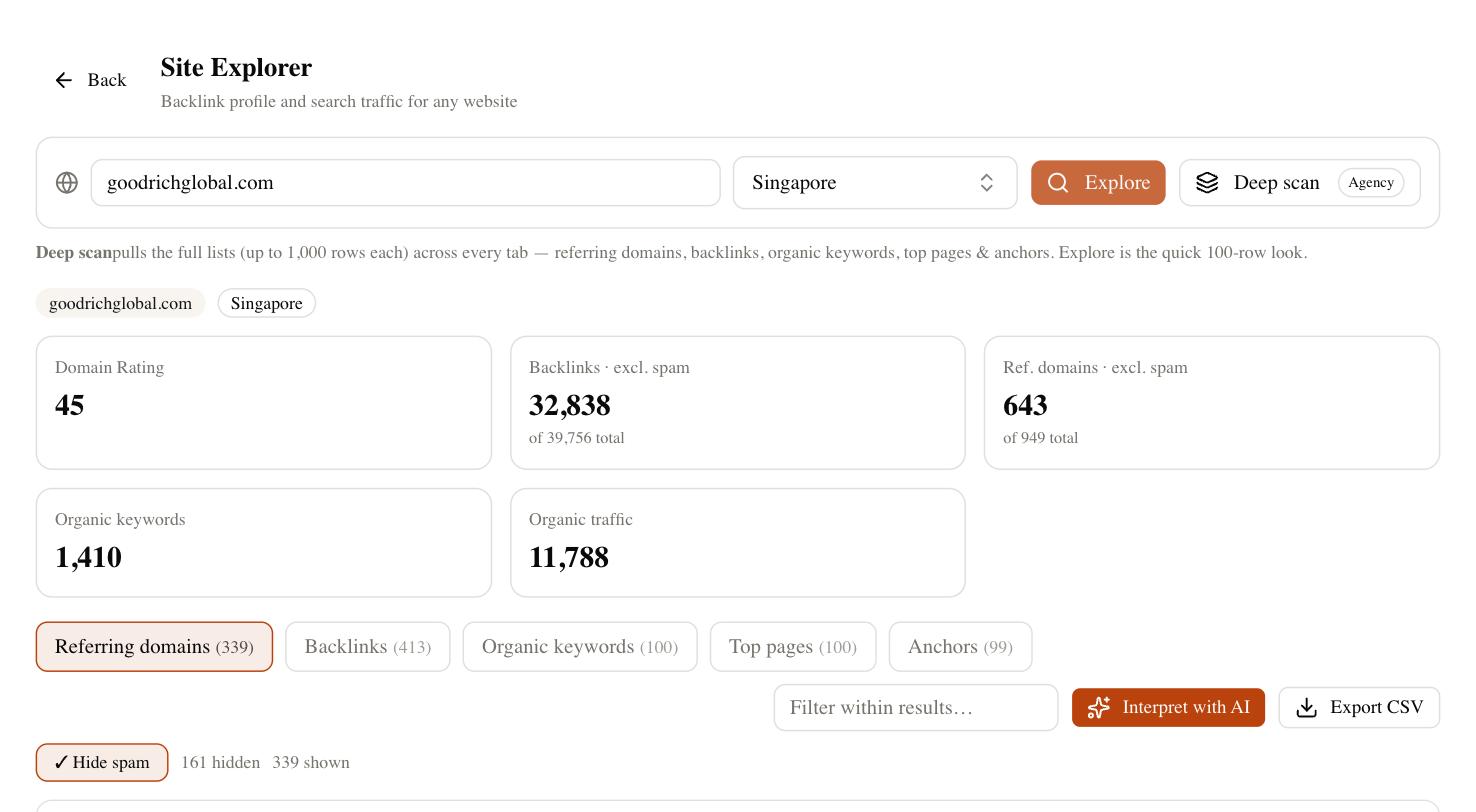
You ask for what you need in plain language and it runs the lookup on real, Ahrefs-grade data underneath — keyword research, competitor gaps, backlink profiles, rank tracking. The part no toolbar touches is AI-search visibility: SEO Rocket’s Brand Radar tracks whether you’re being cited in ChatGPT, Perplexity, and Google’s AI Overviews, which matters more every quarter as buyers ask an assistant instead of scrolling a SERP. For a consultant or agency, the client-dashboard side means you can hand over a read-only report without exporting a thing. If your bottleneck is doing more with fewer tools, that consolidation beats any browser overlay — but if you genuinely just want a free DA number on the SERP, keep reading, because the extensions below do that well.
Ahrefs SEO Toolbar and MozBar — the metric overlays
These two answer the same instinct: how strong is this page, right now, without opening another tab. The Ahrefs SEO Toolbar is the pick if you already pay for Ahrefs — it surfaces an on-page report and layers SERP metrics from one of the largest link indexes in the business directly onto your search results. Without an Ahrefs plan, though, the numbers are limited, so its value is really tied to a subscription you already have.
MozBar is the free-tier classic. Its Domain Authority and Page Authority scores have been an industry shorthand for years, and seeing them overlaid on every SERP result is genuinely useful for quick competitive triage. Just remember DA is Moz’s estimate, not a Google metric — treat it as directional. For a fast gut check on a prospect’s site, MozBar is hard to beat for the price.
Detailed SEO Extension and SEO Minion — the on-page auditors
When your question is about the page itself rather than the domain, these are the tools. Detailed SEO Extension is the cleaner of the two: one click gives you the title, meta description, canonical, heading structure, word count, indexability, and schema — the whole on-page skeleton laid out in seconds. It’s become a default for a lot of technical SEOs because it’s fast, free, and never gets in the way.
SEO Minion covers similar ground and adds a few field-work extras: a SERP preview tool, a broken-link checker, and hreflang validation for international sites. If you audit a lot of multilingual or link-heavy pages, those built-in checks save real time. Neither tool replaces a proper crawler, but for spot audits and quick client questions they’re exactly the right altitude.
Keywords Everywhere, SEOquake and Wappalyzer — data on demand
The last group is about pulling specific data as you browse. Keywords Everywhere puts search volume and related terms inline across Google and many other sites, which is a lovely workflow for ideation — though it runs on a credit system, so heavy use costs a little each month. It won’t match a full keyword platform for depth, but for capturing ideas in the moment it’s excellent.
SEOquake, from the Semrush stable, gives you a configurable SERP overlay and an on-page audit you can export — handy when you want to pull a quick data set out of a search results page. Wappalyzer is the odd one out and all the more useful for it: it detects the CMS, frameworks, analytics, and tools a site runs on, which is invaluable for competitor recon and for scoping a technical migration before you quote it.
How to choose your SEO extension stack
Don’t install ten extensions — they slow the browser and clutter every page. Pick by the question you ask most. If it’s “how strong is this domain,” MozBar or the Ahrefs toolbar covers it. If it’s “what’s wrong with this page,” Detailed SEO Extension is your default. If it’s “what’s this keyword worth,” Keywords Everywhere. If it’s “what’s this site built on,” Wappalyzer. Two or three well-chosen extensions handle ninety percent of the in-browser work most people ever do.
The honest catch is that none of them do the work that actually moves rankings — the crawling, the tracking over time, the writing, the AI-search visibility. Overlays tell you what’s true in this tab today; they don’t build anything. So run a lean extension stack for the live-web questions, and pair it with one platform that does the heavy lifting behind them. Write down the three SEO tasks you actually did last week — if they’re mostly “check a metric, check a page, produce content,” you want a couple of free extensions plus something AI-native like SEO Rocket, not a drawer full of toolbars. Match the tool to the question, and your toolbar stays fast and useful instead of crowded.