There is no single best keyword research tool for YouTube — there’s a best tool for your goal, and most people pick the wrong one because they don’t separate the two jobs. One job is finding what people search for; the other is optimizing a specific video’s title, tags, and metadata inside YouTube. The best keyword research tool for YouTube for a channel strategist is rarely the same as the one a solo creator installs to tweak a single upload.
This is not a padded list of fifteen tools with affiliate buttons. Below are six that actually earn their place, what each is genuinely best at, and the honest answer for when a free option is all you need. If you also run web SEO alongside your channel, that changes the math — so we’ll cover that too.
YouTube keyword research is not Google keyword research
YouTube is the world’s second-largest search engine, but its demand data lives in a different place than Google’s. A term can have thin Google volume and huge YouTube interest — “how to” and tutorial intent skews heavily toward video. That’s why generic web tools sometimes mislead you: they report Google search volume, not how many people type the phrase into the YouTube search bar.
Two signals matter most on YouTube. The first is search demand: are people actually looking for this topic, and how hard is it to surface against existing videos. The second is on-video optimization: your title, description, tags, and the first 48 hours of engagement that tell the algorithm whether to keep pushing your video. Different tools are built for different halves of that, which is the whole reason this comparison exists.
The best YouTube keyword tools at a glance
Start with the table, then read the notes for the two or three that fit how you actually work.
| Tool | Best for | AI-native? | Standout strength | Rough price band |
|---|---|---|---|---|
| SEO Rocket | Creators & agencies planning content strategy across YouTube and web | Yes — chat-first | Real search-demand data plus AI topic planning and gap analysis in one workflow | Low $ / entry-friendly |
| VidIQ | Solo creators optimizing individual uploads | Add-ons | In-browser scores and keyword ideas right on the YouTube page | Free / low $ |
| TubeBuddy | Creators who want tag and metadata workflow tools | Some | Bulk tag editing and A/B thumbnail testing inside YouTube | Free / low $ |
| Ahrefs | SEOs who want deep, cross-engine keyword data | Add-ons | A dedicated YouTube search mode in Keywords Explorer | Higher $$ |
| Keyword Tool | Quick autocomplete-based idea generation | No | Scrapes YouTube autocomplete at scale for long-tail phrases | Low–mid $ |
| YouTube autocomplete + Trends | Beginners and zero-budget research | No | Free, straight from the source of truth | Free |
SEO Rocket — best for content strategy across YouTube and web
SEO Rocket is the pick when keyword research is really the first step of a content plan, not a one-off tag lookup. Instead of a wall of tabs, you ask for what you need in plain language — “find video-friendly topics around home espresso for a beginner audience” — and it runs the lookup on real, Ahrefs-grade search data underneath, then clusters the results into topics you can actually build a content calendar from.
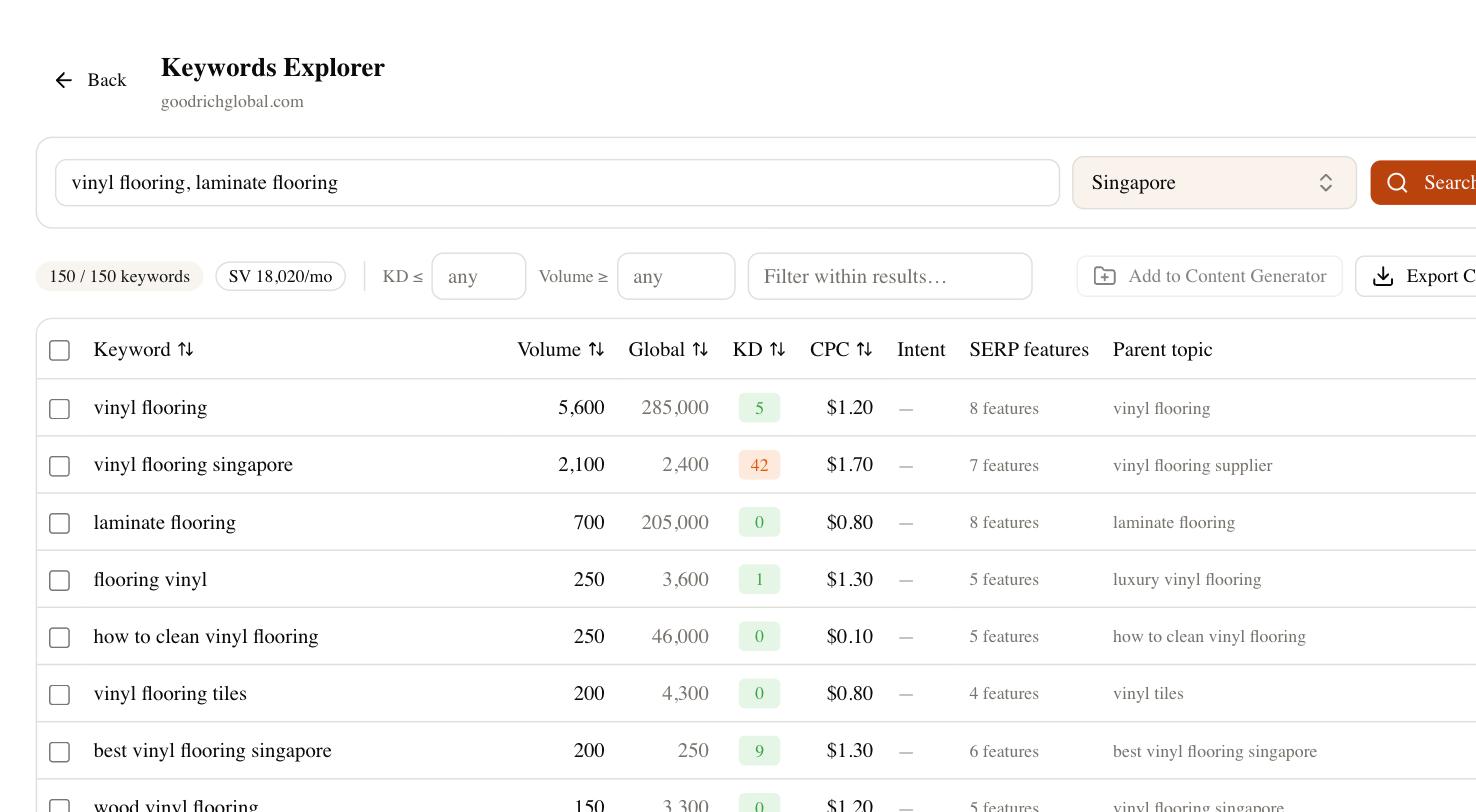
The reason this matters for video creators is that most successful channels don’t live on YouTube alone. You publish the video, then a blog post, then answer the same question where your buyers are searching — including inside AI answers. SEO Rocket shows you search demand and keyword difficulty, drafts the supporting article, and tracks whether your brand is getting cited in ChatGPT, Perplexity, and Google’s AI Overviews. For a creator or agency treating YouTube as one channel in a wider strategy, that consolidation replaces a stack of three tools with one subscription.
Where it’s honest to flag a limit: SEO Rocket is not a browser overlay that scores your title while you sit in the YouTube upload screen. If your entire job is optimizing individual videos inside YouTube’s interface, a native tool below will feel more direct. SEO Rocket is the strategy and demand layer, and it’s the strongest fit when your bottleneck is deciding what to make and connecting it to the rest of your SEO.
VidIQ and TubeBuddy — the YouTube-native browser tools
These two are the creator favorites for a reason: they live inside YouTube. Install the extension and you get keyword scores, competing-video counts, and tag suggestions overlaid directly on the pages you already use. For a solo creator whose question is “should I use this exact title,” the immediacy is hard to beat.
- VidIQ — leans toward keyword and competition scoring. Its in-page numbers give you a fast read on whether a phrase is worth chasing, and the free tier is genuinely usable for getting started.
- TubeBuddy — leans toward workflow. Bulk tag editing, canned responses, and A/B thumbnail testing make it the operational Swiss Army knife once your channel has real volume.
The trade-off with both is depth and scope. Their scores are directional, not precise, and their view stops at YouTube — they won’t tell you the Google demand for the same topic or help you turn a video into a ranking article. Treat their keyword “scores” as a quick sanity check, not gospel, and don’t build a quarter’s strategy on a single green light.
Ahrefs, Keyword Tool, and the free autocomplete route
If you want deep data and already pay for a serious SEO tool, Ahrefs Keywords Explorer has a dedicated YouTube search mode that returns volume and difficulty for the YouTube engine specifically. It’s excellent and thorough, but it’s priced for professionals — entry plans run into the low hundreds a month, which is a lot if video keyword research is your only use for it.
Keyword Tool and similar autocomplete scrapers take a different path: they pull YouTube’s own autocomplete suggestions at scale, so you get hundreds of long-tail phrases real people are typing. It’s a fast way to expand a seed idea, though the free version hides the volume numbers and the paid tiers sit in the low-to-mid range. Useful for ideation, weaker for prioritization.
Do not overlook the free route. YouTube’s own search bar autocomplete is the source of truth for what people type, and Google Trends lets you compare topics on the YouTube Search filter specifically. For a beginner or a zero-budget channel, twenty minutes with autocomplete and Trends will get you further than most people expect. Paid tools save time and add rigor — they don’t replace judgment.
How to choose the best keyword research tool for YouTube
Match the tool to your real constraint, not to a feature list. If you’re a solo creator optimizing individual uploads and you want scores right on the YouTube page, start with VidIQ or TubeBuddy — the free tiers are enough to learn on. If your channel is one part of a broader content and SEO strategy, and you want real demand data, AI topic planning, and article drafting in one place, SEO Rocket is the natural home. If you already live in Ahrefs, use its YouTube mode and skip a second subscription. And if your budget is zero, autocomplete plus Google Trends is a legitimate answer, not a consolation prize.
A quick way to decide: write down the last three things you actually did for your channel. If they were all “tweak this video’s tags,” a native overlay wins. If they were “figure out what to make next,” “check whether the topic has real demand,” and “turn it into a blog post too,” you’re doing strategy work, and a strategy tool will move you faster than any browser extension. Whatever you pick, test it against a topic you already understand — the tool whose numbers match your gut and answer your real question fastest is the right one for you.