A good client seo report template does one job: it tells a non-SEO whether their money is working, in language they understand, in under five minutes. Most reports fail at exactly that — they dump twenty charts, bury the one number the client cares about, and leave them more confused than before they opened the PDF. This guide hands you a client seo report template you can copy straight into a doc, a fillable checklist, and a worked example, then shows how to stop building it by hand every month.
The template below works for a solo consultant with three clients and for an agency with thirty. It is deliberately short. If you cannot fit a month of work onto two screens, you are reporting activity, not results — and clients pay for results.
What a client report actually needs to answer
Before any layout, get clear on the questions running through a client’s head when the report lands. There are only four, and every section you add should answer one of them. Is my visibility going up or down? Am I getting more of the right traffic? Is that traffic turning into leads or sales? And what did I pay you to do this month? Anything that doesn’t map to one of those four is decoration.
The trap is confusing effort with outcome. Clients don’t buy blog posts or backlinks; they buy customers. A report that leads with “we published eight articles” invites the question “and?” A report that leads with “you now rank on page one for three terms that drove 40 leads” answers it before it’s asked. Keep effort in the report, but keep it near the bottom, framed as the cause of the results above it. When a client can trace a lead back to a specific ranking, the retainer stops feeling like a cost and starts feeling like an investment — and that shift is the whole point of reporting.
The client SEO report template (checklist)
Here is the full structure, top to bottom, in the order a client should read it. Copy this into your reporting doc and fill each line. Sections one and two are non-negotiable; the rest you include when they’re relevant to the engagement.
- One-line summary — the headline result in plain English (“Organic traffic up 18% month over month; two new page-one rankings”).
- Traffic snapshot — organic sessions this month vs last month vs same month last year, with the percentage change.
- Rankings movement — the tracked keywords that moved, positions gained or lost, and which ones crossed onto page one.
- Conversions — leads, calls, or sales attributed to organic, and cost per lead if you have it.
- AI-search visibility — whether the brand is being cited in ChatGPT, Perplexity, or Google’s AI Overviews for target questions.
- Work completed — content published, technical fixes, links earned, framed as the cause of the numbers above.
- Next month’s plan — the two or three priorities, so the client sees where the budget goes next.
- Notes and risks — algorithm updates, seasonality, or anything that will move the numbers you don’t control.
Notice what’s missing: bounce rate, average session duration, and a dozen other metrics that feel professional but tell a business owner nothing. Leave vanity metrics out. If a number wouldn’t change a decision the client makes, it doesn’t earn a row.
A filled example you can copy
Templates are easier to trust when you can see one filled in. Here is a single month for a fictional plumbing client, formatted the way it would appear in the report. Swap the numbers for your own and the shape holds.
| Section | This month | Change | Plain-English note |
|---|---|---|---|
| Summary | Organic traffic up 18%, two keywords hit page one, 12 form leads from search. | ||
| Organic sessions | 3,140 | +18% MoM | Best month since we started. |
| Page-one keywords | 14 | +2 | “emergency plumber [city]” now #4. |
| Leads from organic | 12 | +3 | ~$41 cost per lead this month. |
| AI-search citations | 3 | +1 | Cited in ChatGPT for “burst pipe” queries. |
| Work done | 2 service pages, 1 guide, 4 links | Drove the ranking gains above. | |
| Next month | Build out the “water heater” cluster; fix mobile speed on service pages. | ||
Two things make this example work. Every row has a plain-English note that translates the number into meaning, and the summary at the top repeats the three facts a busy owner would remember. A client can skim the first two rows, feel genuinely informed in seconds, and read the rest only if they happen to want the underlying detail.
How often to send it and in what format
Monthly is right for most retainers. SEO moves slowly — positions jitter three or four spots day to day and content takes weeks to mature — so weekly reports create noise and anxiety over changes that mean nothing. Send it in the first few days of the month, covering the month just finished, and keep the format consistent so the client learns where to look.
Format matters less than people think, as long as it’s readable on a phone. A shared live dashboard beats a static PDF because the client can check in whenever they like, and you’re never caught exporting screenshots at midnight. Whatever you choose, send the same structure every time. Consistency is what turns a report into something a client trusts rather than re-reads suspiciously.
Mistakes that get reports ignored
The fastest way to lose a client is a report they don’t understand and won’t admit they don’t understand. A few patterns cause most of the damage, and all of them are avoidable.
- Leading with effort. “We wrote eight posts” belongs near the bottom, as the reason results moved — not as the headline.
- Unexplained jargon. Domain rating, impressions, and CTR mean nothing without a one-line translation into money or customers.
- Only good news. Hiding a ranking drop erodes trust when the client eventually notices. Name it, explain it, show the plan.
- No next step. A report without a forward plan reads like the work is finished, which is the last impression a retainer wants to give.
Be honest about the things you don’t control. If a core algorithm update shook positions, say so. If demand is seasonal, flag it before the client panics at January’s dip. Naming the risk before it bites is what separates an advisor from a vendor.
Let SEO Rocket fill the template for you
Building this by hand every month is where most consultants quietly lose an afternoon. SEO Rocket assembles the whole report from live data — rankings, organic traffic, conversions, and AI-search citations — against real, Ahrefs-grade numbers, so the sections in this template populate themselves. You ask for a client report in plain language and it returns the summary, the movement, and the work done, ready to review.
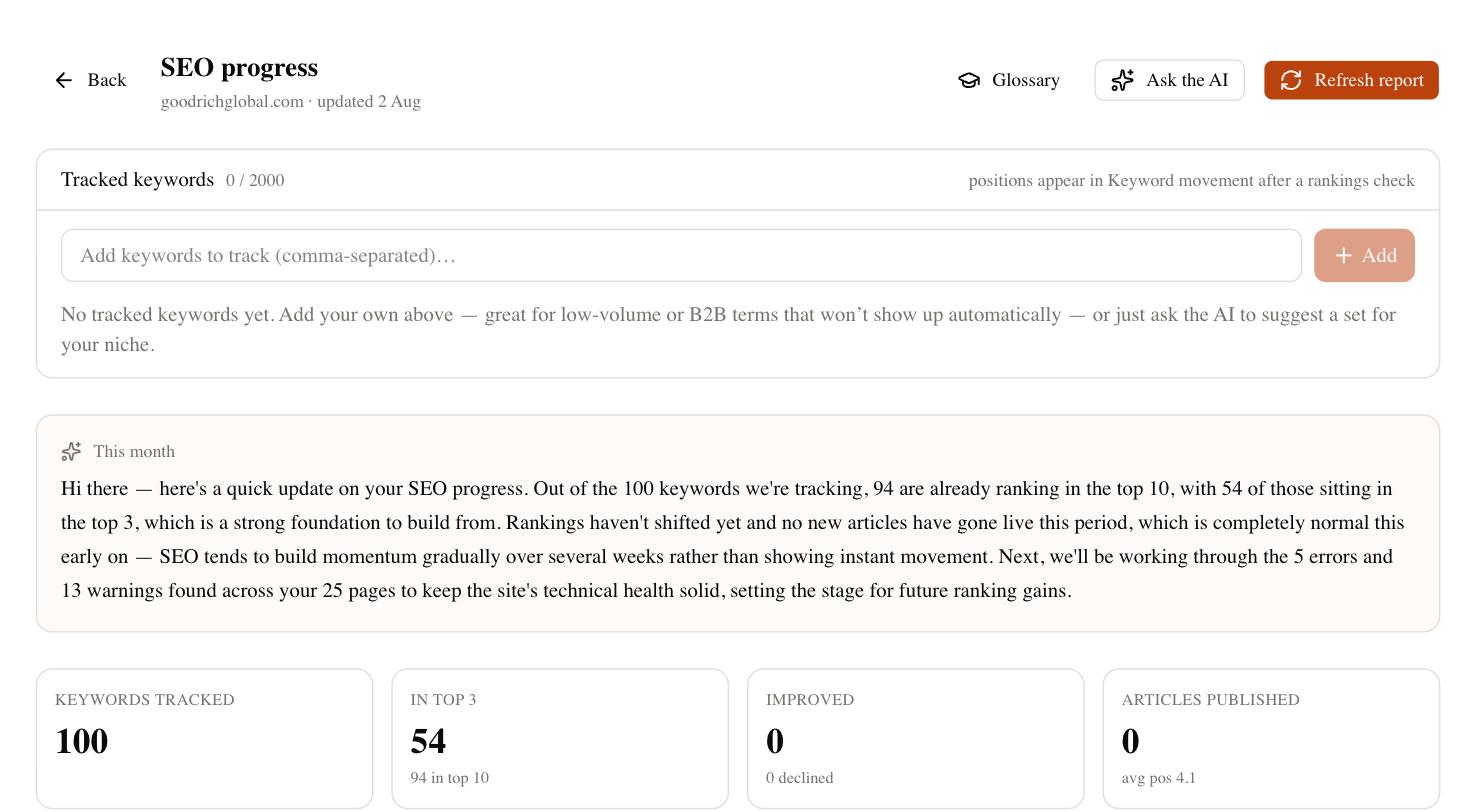
The part that saves the relationship, not just the afternoon, is the read-only client dashboard. Instead of exporting a PDF, you hand the client a white-label link they can open any time — the same four answers, always current, in your branding rather than a tool’s. Rank tracking, competitor gaps, and site-audit findings feed the same view, so the report and the work stay in sync without a manual export step. And because AI-search visibility is tracked natively, the fifth section of the template — the one no traditional reporting tool answers — is already filled.
Make the template your own
Start with the eight sections above, then cut anything a specific client doesn’t care about and add nothing they won’t read. A local business wants leads and page-one rankings; a publisher wants sessions and topic coverage; an e-commerce brand wants revenue by category. The client seo report template is a spine, not a straitjacket — the discipline is keeping every row tied to one of the four questions a client is really asking.
Whatever you keep, send it on the same day every month, lead with the one number that matters, and always tell them what happens next. Do that consistently and the report stops being a monthly chore you dread and becomes the strongest retention tool you have — the document that reminds a client, every single month, exactly why they still pay you.